Every month I set a 30 day challenge for myself. The idea is to
form new habits, create more free traffic, advance my knowledge on
marketing and to solidify an already unstoppable mindset. The process is
very powerful. It has been responsible for my continuing growth in this
industry, and will continue to do so as long as keep setting these
goals. Today I want to run through this month's challenge I set for
myself. My hope is that you see the power in this simple process and
start to implement it into your own daily, weekly and monthly schedule.
It's very easy to get distracted in this business, to stay focused, we
must have some sort of plan.
At the end of this Month's challenge I will have the following list completed...
Personal:
1) I will have meditated consistently for 20 minutes every day this month.
2) I will have completed a 30 day exercise program.
3) I will have drank 150 pints of water.
4) I will have listened to 5 inspirational and motivational audiobooks.
5) I will have contemplated my future for 10 hours in a quiet room.
6) I would have taken 30 walks around the local park to clear my head every morning.
Professional:
1) I will have written 5 guest posts on high traffic blogs.
2) I will have created 5 videos about my business and uploaded them to the top 10 video sharing websites.
3) I will have written 5 press releases and submitted them to top 10 sites.
4) I will have commented on 300 hundred blog posts within my niche with a link back to my website.
5) I will have added 450 valuable comments to forums within my niche.
6) I will have written 30 blog posts for my own website.
7) I will submit all articles to top 5 directories for syndication.
8) I will convert 30 posts into PDF and submit to top 10 sharing websites.
9) I will have read 5 marketing eBooks related to my business.
At
first glance the above 30 day goals may seem like a lot, but actually,
this process is very simple to do. After the first 20 days have passed I
will be on the way to forming a few new habits, plus, I will begin to
see consistent traffic coming to my website.
Let me break down how I implement this strategy each day.
· I get up out of bed at 6am.
· Drink a pint of water and eat healthy breakfast.
· I take a 15 minute walk around the local park.
· I then meditate for 20 minutes.
· I exercise for 20 minutes.
· I write blog post for website.
· I comment on 10 blog posts within my niche.
· I leave 5 comments on 3 different forums.
· I then read 10 to 20 pages of a business eBook.
· I contemplate how the information in the book can help my business (20 minutes)
Everything
above brings me up to about 12 o clock. It's time for a break at this
stage and I usually get out of the house for an hour or two. When I come
back, I'll most likely implement a few more traffic generating
strategies like social bookmarking, interaction on Facebook and twitter
etc. My goal is always complete my daily (30 day challenge) tasks before
I move onto anything else.
On alternative days I will also
include writing a press release, a guest post, or create a video. Once I
produce 5 of each within the 30 days I'm good to go. Everything is
chartered on my whiteboard which is in front of me at all times. If I
fail to do even one task on my list, the 30 days start all over again.
This takes a little bit of discipline but once you persevere through the
20 day mark, it gets very easy to continue. I have formed some
fantastic new habits just from this daily, weekly and monthly challenges
I set for myself.
I also have an end goal for what I want to have
achieved by the end of the 30 days. For example, with the traffic
generating goals I set for myself, I would be aiming to get a consistent
"20 leads" a day into my business. Sometimes I'll set a goal to have 40
leads coming into my business on a daily basis once the 30 days have
been completed.
Showing posts with label Seo Strategy. Show all posts
Getting Started With Bing Webmaster Tools
-
 Unknown
-
 No comments
-
 Wednesday, August 1, 2012
-
 Blogger
,
SEO
,
Seo Strategy
,
Seo Tips
,
SEO Tools
,
Webmaster Tools
,
White Hat Seo
Blogger
,
SEO
,
Seo Strategy
,
Seo Tips
,
SEO Tools
,
Webmaster Tools
,
White Hat Seo
When it comes to search engine optimization of a Website,
we should make sure we optimize our site for all the search engines and
not just one. Google is most popular search engine at the moment
followed by Bing and others, and from last few months traffic coming
from Bing search is increasing. Seems like Google algo changes which
created lots of negative buzz, made Microsoft worked hard on their
search engine and they have been integrating many things in their search
engine like Social signals and deep Facebook integration.
Now, this post is not about bing search but it’s about Bing Webmaster tools which will help Websites owners and Bloggers to get their site on Bing search index and get more traffic from it.
I will keep this guide simple and up to the point to get your site indexed in Bing Search and in upcoming tutorials, I will explain other things that you can do with this free Webmaster tool.
Like any other Webmaster tools, you need to create a Free account or you can use your existing Windows live ID to login to your Webmaster account. Here is the link to get started. Once you are signed up and created your account, first step is to add your Website and verify.
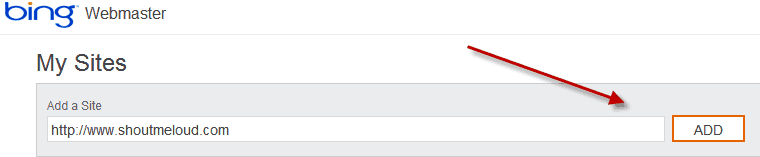 Once you have submitted your Website, you need to add details related
to site and ownership like sitemap link, Website owner details and so
on. If you have not created your blog sitemap yet, you can easily create
using Google XML sitemap plugin and
add your sitemap link in the Site info page. Providing your sitemap
link will help Bing bots to deep crawl and index more pages on your
site.
Once you have submitted your Website, you need to add details related
to site and ownership like sitemap link, Website owner details and so
on. If you have not created your blog sitemap yet, you can easily create
using Google XML sitemap plugin and
add your sitemap link in the Site info page. Providing your sitemap
link will help Bing bots to deep crawl and index more pages on your
site.
 Another interesting thing is, you can set Email communication
preference and how often you would like to receive email for your site
health issues. Since my Website is my full-time business too, I set it
as daily alert so that I get notified regarding any site issues.
Another interesting thing is, you can set Email communication
preference and how often you would like to receive email for your site
health issues. Since my Website is my full-time business too, I set it
as daily alert so that I get notified regarding any site issues.
 Once you have filled out all the details, click on Save and you will
be redirected to Bing Webmaster tool dashboard, where you will see a
message next to your site saying ” Site ownership has not been verified, Verify now“.
Click on Verify now and use any of the method to verify your site. I
find the adding meta tag to be easiest one, but you can pick any of the
three verification process:
Once you have filled out all the details, click on Save and you will
be redirected to Bing Webmaster tool dashboard, where you will see a
message next to your site saying ” Site ownership has not been verified, Verify now“.
Click on Verify now and use any of the method to verify your site. I
find the adding meta tag to be easiest one, but you can pick any of the
three verification process:

Copyright of shoutmeloud.com
Now, this post is not about bing search but it’s about Bing Webmaster tools which will help Websites owners and Bloggers to get their site on Bing search index and get more traffic from it.
I will keep this guide simple and up to the point to get your site indexed in Bing Search and in upcoming tutorials, I will explain other things that you can do with this free Webmaster tool.
How to Submit your site to Bing Webmaster tools:
If you are complete new to this, Bing webmaster tool is a free service by Microsoft for webmasters to submit their site and get a complete SEO report and information related to their site. In-fact, there are many features which are not even available on Google Webmaster tools and there is no reasons you should not submit your Website to Bing Webmaster tool.Like any other Webmaster tools, you need to create a Free account or you can use your existing Windows live ID to login to your Webmaster account. Here is the link to get started. Once you are signed up and created your account, first step is to add your Website and verify.
- File upload
- Adding Meta tag in Header
- CNAME record to DNS
Site Verified on Bing and What next?
So far, we have submitted our site to bing Webmaster tools and done with the verification. Next step is to configure few settings which will help up to get an extra edge.
Submit more sitemaps to Bing:
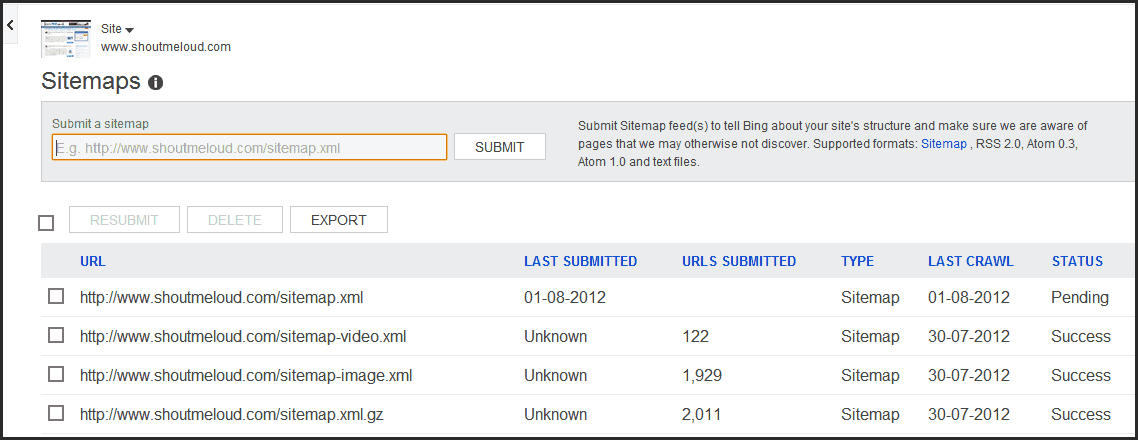
I have created separate sitemap for Images and videos and I must
admit Bing bots are smart enough to pick all sitemaps from an existing
site. You can generate your Image and video sitemap using Image sitemap and video sitemap plugins and under Dashboard > Configure my site> Sitemap you can add new sitemap to Bing.
Submit individual URL:
If you have submitted a complete new site and
it may take time for bing bots to crawl and index your site completely,
you can manually add few links in here. Bing have put a limit of 50
URL’s submission per month and daily cap is 10. You should also check
our earlier guide on how to make bots to crawl your site faster.
Ignore URL parameters:
If your site pages are indexed with URL parameters like replytocom in Bing search, you can simply add this Parameter here and ask bing to ignore all such links. I hope if Bing populates few URL parameter by default like Google Webmaster tools does.
When I checked my indexed pages in Bing search, I realized I have few
pages with attachment_id parameter indexed, now you all know what I did
to get rid of such links from Bing.
Crawl Control:
This is another interesting feature by BWT, as they allow you to control when Bing bots
should crawl your site more. So, you can set the most busy time of your
blog and bing bots will select the time to crawl your site more when
your site is less busy. This is useful for high traffic sites and sites
with limited hosting bandwidth.
Block URL’s and directory in Bing search:
So somehow, bots started indexing your wp-content, tags or categories
folder. Or you decided to remove all tags and categories or any other
directory from Bing search, this section will help you to do the same.
You can stop indexing of any page or directory on your site using Block
URL section. This manual URL removal applies for 90 days and you will
get an Email notification 8 days prior to completion of 90 days, and you
can decide to keep the out of index or let it index in Bing.
Grant Access to your Webmaster tool to other users:
This is useful for many people like me who offers Free WordPress setup,
as I can quickly add my client site using my Bing webmaster tools
account and give him admin access later. Also, if you manage your blog
with a team or
with a partner, you can quickly give access to your site webmaster tool
using users section. There are three roles which you can given:- Read only
- Read and modification
- Administrator access
Copyright of shoutmeloud.com

 Peek at the comments (
0
)
Peek at the comments (
0
)
30 Days to More Productivity and Traffic
-
Unknown
-
No comments
-
Friday, July 27, 2012
-
Free Backlinks
,
SEO
,
Seo Strategy
,
Seo Tips
,
Traffic
,
White Hat Seo
7 Proven Steps To Generate Traffic To Your Website
-
Unknown
-
No comments
-
SEO
,
Seo Strategy
,
Seo Tips
,
White Hat Seo
Generating traffic to your website is imperative if you intend to
make money online. This is usually the main challenge for a new web
business. In this article I will cover 7 simple steps to get started in
generating targeted traffic to your website:
1. Ensure that you have high quality content:
The first thing that you need to do is to have good quality content. In the World Wide Web, content is king!!!
The only way to have a flow of targeted traffic visiting you website daily is by having relevant content. Search engines love good strong content.
Commit the time and effort to create strong engaging content. Make this a high priority; this is important to your successful website.
2. Social Network Marketing:
This is by far the best way in my opinion to generate targeted traffic to your website, if done right of course. Social Networks are growing like wild fire and have a thriving market for every niche. There are many social networks and more still to come, get involved immediately.
3. Go for affiliates:
Affiliate programs mean that you will hire individuals to promote your website or products. In exchange, you will have to pay them a certain percentage of your profits, their commissions. There are many ways to pay your affiliates and you can choose any way that suits you. This is great way to delegate and leverage the marketing of your website.
4. Submitting to directories:
In order to make your website more visible, submit it to popular directories like Open Directory Project, Zeal and others. You can also submit to directories which have themes so that their topics are relevant to your website. You can also go for small directories which can get hold of a lot of in bound links for you.
5. Go for a bit of video marketing:
Make a video promoting your website and then post it on any of the popular video websites. Post it on YouTube, Break.com or even on various social networking sites. Try to make an interesting video which will be appreciated by your target audience. If they like your video, they will circulate it and that would be a great kind of publicity for your website. Make it a point to include the URL of your website in that video.
6. Create free reports, articles and blog post:
Create enticing reports, blog posts and articles with relevant content to your business. A great way to promote your website is to add a link of your website frequently to these. Once you write the report, give it away for free to different website owners, article directories, blog sites, etc. Once these go viral you can ensure that you will get a great deal of traffic.
7. Posting free ads:
Post advertisements in places where you are sure to get traffic. Craigslist is a great place to post a free ad; forums are also great for this. Be creative let your ads stand out, use images, colors, etc.
1. Ensure that you have high quality content:
The first thing that you need to do is to have good quality content. In the World Wide Web, content is king!!!
The only way to have a flow of targeted traffic visiting you website daily is by having relevant content. Search engines love good strong content.
Commit the time and effort to create strong engaging content. Make this a high priority; this is important to your successful website.
2. Social Network Marketing:
This is by far the best way in my opinion to generate targeted traffic to your website, if done right of course. Social Networks are growing like wild fire and have a thriving market for every niche. There are many social networks and more still to come, get involved immediately.
3. Go for affiliates:
Affiliate programs mean that you will hire individuals to promote your website or products. In exchange, you will have to pay them a certain percentage of your profits, their commissions. There are many ways to pay your affiliates and you can choose any way that suits you. This is great way to delegate and leverage the marketing of your website.
4. Submitting to directories:
In order to make your website more visible, submit it to popular directories like Open Directory Project, Zeal and others. You can also submit to directories which have themes so that their topics are relevant to your website. You can also go for small directories which can get hold of a lot of in bound links for you.
5. Go for a bit of video marketing:
Make a video promoting your website and then post it on any of the popular video websites. Post it on YouTube, Break.com or even on various social networking sites. Try to make an interesting video which will be appreciated by your target audience. If they like your video, they will circulate it and that would be a great kind of publicity for your website. Make it a point to include the URL of your website in that video.
6. Create free reports, articles and blog post:
Create enticing reports, blog posts and articles with relevant content to your business. A great way to promote your website is to add a link of your website frequently to these. Once you write the report, give it away for free to different website owners, article directories, blog sites, etc. Once these go viral you can ensure that you will get a great deal of traffic.
7. Posting free ads:
Post advertisements in places where you are sure to get traffic. Craigslist is a great place to post a free ad; forums are also great for this. Be creative let your ads stand out, use images, colors, etc.
Why Add Guest Blogging to Your SEO Campaign?
-
Unknown
-
No comments
-
SEO
,
Seo Strategy
,
Seo Tips
,
White Hat Seo
There are a lot of SEO professionals who are saying that guest
blogging is one of the most effective ways to improve the rankings of
your website. However, there are still a lot of people who are not using
it, thinking that they will only provide another website with a content
that they worked hard for. Guest blogging is a process wherein you will
be submitting a blog post to another blog and have it posted there. The
owner of the blog will then review your post and will have it published
on his website, together with a link pointing to your blog or website.
If you think that SEO now only revolves around the content that you have on your website, then you're optimizing your website the wrong way. You still need to build links around it, but it should have the quality and consistency of a credible informant. Since you will only be submitting your blog post to an authority site, you will be able to enjoy link juice that is coming from a website that has better position than yours. Aside from this, the readers of the blog where you published your post will also find your site, and if you give them all the information that they are looking for, chances are, they will be your subscribers.
The fact that you will be able to enjoy link juice coming from authority sites is already enough for you to start considering guest blogging. Imagine if you can get at least a post with a link every day from different websites. Where do you think your website will be? Below or above the websites of your competitors? This is something that you need to think of, especially now that it is not that hard for one to create a blog post that is referring to a particular topic. Just make sure that you are going to submitting a post that is unique, and will never be submitted to another website; else you will only be wasting your time and will probably ruin your website and your reputation as a blogger at the same.
If you still think that you are not capable of creating blog posts on a regular basis, then it would be better if you are going to look for a company that can provide you with such service. This will be a lot easier because these companies are also optimizing their own websites for it to appear higher in the search results. All you have to do is to compare them with each other and choose the one that has the best services, reputation, and of course, pricing structure. There are a lot of SEO companies that are promising to be the best, but the truth is that they cannot even deliver half of what they are claiming. Be very careful with it, because a wrong company could not only waste your money, but also ruin the rankings of your website, together with the performance of your business.
If you think that SEO now only revolves around the content that you have on your website, then you're optimizing your website the wrong way. You still need to build links around it, but it should have the quality and consistency of a credible informant. Since you will only be submitting your blog post to an authority site, you will be able to enjoy link juice that is coming from a website that has better position than yours. Aside from this, the readers of the blog where you published your post will also find your site, and if you give them all the information that they are looking for, chances are, they will be your subscribers.
The fact that you will be able to enjoy link juice coming from authority sites is already enough for you to start considering guest blogging. Imagine if you can get at least a post with a link every day from different websites. Where do you think your website will be? Below or above the websites of your competitors? This is something that you need to think of, especially now that it is not that hard for one to create a blog post that is referring to a particular topic. Just make sure that you are going to submitting a post that is unique, and will never be submitted to another website; else you will only be wasting your time and will probably ruin your website and your reputation as a blogger at the same.
If you still think that you are not capable of creating blog posts on a regular basis, then it would be better if you are going to look for a company that can provide you with such service. This will be a lot easier because these companies are also optimizing their own websites for it to appear higher in the search results. All you have to do is to compare them with each other and choose the one that has the best services, reputation, and of course, pricing structure. There are a lot of SEO companies that are promising to be the best, but the truth is that they cannot even deliver half of what they are claiming. Be very careful with it, because a wrong company could not only waste your money, but also ruin the rankings of your website, together with the performance of your business.
How to Write a 400 Word Article Quickly
-
Unknown
-
No comments
-
SEO
,
Seo Strategy
,
Seo Tips
,
White Hat Seo
One of the real keys to article marketing is to be able to write articles quickly. This means being able to crank out 400 word articles fast, so fast that in one hour you can write 3-5 articles. This means that in one year, you could write 1000 or more articles, writing just one hour per day. That's right - 3 articles a day = 1000 articles a year, give or take. And 5 per day = about 1500 per year. Imagine if one year ago you had started writing 5 articles per day, and you had 1000 or 1500 articles online right now, what would that really mean for you? What would it mean for you if you had that many articles right now?
How much more traffic would you be getting to your website? Would it be worth it? If you think it would be worth it, then the next step is to ask "what can I do to get to where I can do it"? So if it is important, then you take the next step - just do it. And in this article, I will show you how.
First, you are limited by your typing speed. If you type at 20 words per minute, you can type 400 words in 20 minutes. If you type less than 20 words per minute, it will take you longer. If you type at LESS than 20 words per minute, I suggest finding a way to type faster. That might mean practice. That might mean taking a typing class. Would it be worth taking one month and learning to type faster to be able to type 2 times as fast for the rest of your life? You would double your productivity! Imagine that. One month investment in typing. And a doubling of personal productivity for the rest of your life!
So just do it. Learn to type faster.
Second: Learn to organize your articles faster. The way I do it is think of a topic. Then in the first paragraph I explain why it is important that I share what I am going to write about. Notice how I do this in this article. Go read my last 5 articles as more examples.
3rd: Now just write the article. Don't worry about structure of the article. Just write what you know. It's only 400 words. You can speak 400 words in about 3 minutes. Just write what comes to your mind. Edit later. You might not need to make any edits except for spelling. Just write.
By Sean R Mize
SEO Ranking: Coping With Constant Changes!
-
Unknown
-
No comments
-
Tuesday, March 6, 2012
-
Blogger
,
SEO
,
Seo Strategy
,
White Hat Seo
Any website owner would be distressed to see their ranking on the
search engines drop overnight. A first reaction might be an urgent call
to ask the designer what went wrong. The revolution in business
development, internet marketing strategy, new clients and keeping with
time constraints are some of the challenges that SEO copes with as well
as constant change. So it is indeed important to know about some of the
ongoing activities happening on the internet that directly affects SEO
ranking.
Google Preview
On November 11, 2010 Google launched a new feature in online search, the Google instant preview. This is the ability to have a glimpse of the web page design on the Google SERP's. Located next to the title in any search result is a "magnifying glass" icon that can be clicked on and a preview of the website pops up.
In terms of SEO, Google preview means there is now a visual representation of individual web design that can impress users through any search results preview. A poorly designed index web page perceived by a user will most likely not be clicked on to be viewed. Changes such as this to a leading search engine becomes a continuous challenge to web designers to catch the user's attention with a simple lay-out scheme.
Best Trends
With differing opinions regarding users searching capability and the best web design SEO practices, it still is possible to ensure that a website ranks high on SERP's. Following are the three best trends that can be applied to increase SEO rankings in these changing times.
Google Preview
On November 11, 2010 Google launched a new feature in online search, the Google instant preview. This is the ability to have a glimpse of the web page design on the Google SERP's. Located next to the title in any search result is a "magnifying glass" icon that can be clicked on and a preview of the website pops up.
In terms of SEO, Google preview means there is now a visual representation of individual web design that can impress users through any search results preview. A poorly designed index web page perceived by a user will most likely not be clicked on to be viewed. Changes such as this to a leading search engine becomes a continuous challenge to web designers to catch the user's attention with a simple lay-out scheme.
Best Trends
With differing opinions regarding users searching capability and the best web design SEO practices, it still is possible to ensure that a website ranks high on SERP's. Following are the three best trends that can be applied to increase SEO rankings in these changing times.
- Social Media Optimization (SMO) - SMO is an internet marketing strategy using social media sites such as Facebook, MySpace, Twitter, YouTube and many others. Using various SMO to communicate products to social media users can greatly help achieved goals to optimize a business website. SMO offers added features like: RSS feeds; sharing buttons; polling tools; functionality for incorporating videos, presentations and images; user ratings and other promotional activities like blogging; comments; ability to participate in discussion groups; and posting personal status updates, all of which can be advantageous for any business internet presence.
- Real Time Search - This is one of the innovative features added to Google search that began in December 2009. Through this feature, finding the most relevant result is easier since dynamic results are being delivered from many different sources including real-time information. This changed algorithms and Google's gained power over its competitors to offer SEO benefits by: utilizing the latest topical and breaking news to improve SEO; getting feedback to improve business performance; and scan for great ideas on trending topics to start business marketing campaigns.
- Load Time - As had been predicted, one of the changes that leading search engines implemented and rapidly affected website SEO rankings was the page load time. If any page on a website takes too long to load, a decline in ranking should be expected. Note what Google recommends: that pages should load within 3 seconds or less; it accomplished, high-ranking can be continually enjoyed on this leading search engine.


 Blog Feed
 Follow Me on Twitter
 My Facebook
 TOP
TOP