Every month I set a 30 day challenge for myself. The idea is to
form new habits, create more free traffic, advance my knowledge on
marketing and to solidify an already unstoppable mindset. The process is
very powerful. It has been responsible for my continuing growth in this
industry, and will continue to do so as long as keep setting these
goals. Today I want to run through this month's challenge I set for
myself. My hope is that you see the power in this simple process and
start to implement it into your own daily, weekly and monthly schedule.
It's very easy to get distracted in this business, to stay focused, we
must have some sort of plan.
At the end of this Month's challenge I will have the following list completed...
Personal:
1) I will have meditated consistently for 20 minutes every day this month.
2) I will have completed a 30 day exercise program.
3) I will have drank 150 pints of water.
4) I will have listened to 5 inspirational and motivational audiobooks.
5) I will have contemplated my future for 10 hours in a quiet room.
6) I would have taken 30 walks around the local park to clear my head every morning.
Professional:
1) I will have written 5 guest posts on high traffic blogs.
2) I will have created 5 videos about my business and uploaded them to the top 10 video sharing websites.
3) I will have written 5 press releases and submitted them to top 10 sites.
4) I will have commented on 300 hundred blog posts within my niche with a link back to my website.
5) I will have added 450 valuable comments to forums within my niche.
6) I will have written 30 blog posts for my own website.
7) I will submit all articles to top 5 directories for syndication.
8) I will convert 30 posts into PDF and submit to top 10 sharing websites.
9) I will have read 5 marketing eBooks related to my business.
At
first glance the above 30 day goals may seem like a lot, but actually,
this process is very simple to do. After the first 20 days have passed I
will be on the way to forming a few new habits, plus, I will begin to
see consistent traffic coming to my website.
Let me break down how I implement this strategy each day.
· I get up out of bed at 6am.
· Drink a pint of water and eat healthy breakfast.
· I take a 15 minute walk around the local park.
· I then meditate for 20 minutes.
· I exercise for 20 minutes.
· I write blog post for website.
· I comment on 10 blog posts within my niche.
· I leave 5 comments on 3 different forums.
· I then read 10 to 20 pages of a business eBook.
· I contemplate how the information in the book can help my business (20 minutes)
Everything
above brings me up to about 12 o clock. It's time for a break at this
stage and I usually get out of the house for an hour or two. When I come
back, I'll most likely implement a few more traffic generating
strategies like social bookmarking, interaction on Facebook and twitter
etc. My goal is always complete my daily (30 day challenge) tasks before
I move onto anything else.
On alternative days I will also
include writing a press release, a guest post, or create a video. Once I
produce 5 of each within the 30 days I'm good to go. Everything is
chartered on my whiteboard which is in front of me at all times. If I
fail to do even one task on my list, the 30 days start all over again.
This takes a little bit of discipline but once you persevere through the
20 day mark, it gets very easy to continue. I have formed some
fantastic new habits just from this daily, weekly and monthly challenges
I set for myself.
I also have an end goal for what I want to have
achieved by the end of the 30 days. For example, with the traffic
generating goals I set for myself, I would be aiming to get a consistent
"20 leads" a day into my business. Sometimes I'll set a goal to have 40
leads coming into my business on a daily basis once the 30 days have
been completed.
Showing posts with label Seo Strategy. Show all posts
Getting Started With Bing Webmaster Tools
-
 Unknown
-
 No comments
-
 Wednesday, August 1, 2012
-
 Blogger
,
SEO
,
Seo Strategy
,
Seo Tips
,
SEO Tools
,
Webmaster Tools
,
White Hat Seo
Blogger
,
SEO
,
Seo Strategy
,
Seo Tips
,
SEO Tools
,
Webmaster Tools
,
White Hat Seo
When it comes to search engine optimization of a Website,
we should make sure we optimize our site for all the search engines and
not just one. Google is most popular search engine at the moment
followed by Bing and others, and from last few months traffic coming
from Bing search is increasing. Seems like Google algo changes which
created lots of negative buzz, made Microsoft worked hard on their
search engine and they have been integrating many things in their search
engine like Social signals and deep Facebook integration.
Now, this post is not about bing search but it’s about Bing Webmaster tools which will help Websites owners and Bloggers to get their site on Bing search index and get more traffic from it.
I will keep this guide simple and up to the point to get your site indexed in Bing Search and in upcoming tutorials, I will explain other things that you can do with this free Webmaster tool.
Like any other Webmaster tools, you need to create a Free account or you can use your existing Windows live ID to login to your Webmaster account. Here is the link to get started. Once you are signed up and created your account, first step is to add your Website and verify.
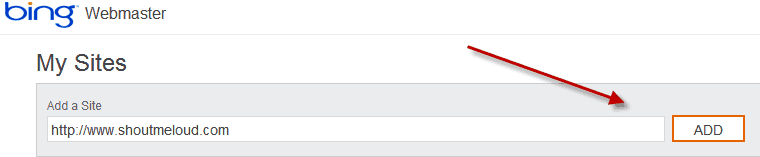 Once you have submitted your Website, you need to add details related
to site and ownership like sitemap link, Website owner details and so
on. If you have not created your blog sitemap yet, you can easily create
using Google XML sitemap plugin and
add your sitemap link in the Site info page. Providing your sitemap
link will help Bing bots to deep crawl and index more pages on your
site.
Once you have submitted your Website, you need to add details related
to site and ownership like sitemap link, Website owner details and so
on. If you have not created your blog sitemap yet, you can easily create
using Google XML sitemap plugin and
add your sitemap link in the Site info page. Providing your sitemap
link will help Bing bots to deep crawl and index more pages on your
site.
 Another interesting thing is, you can set Email communication
preference and how often you would like to receive email for your site
health issues. Since my Website is my full-time business too, I set it
as daily alert so that I get notified regarding any site issues.
Another interesting thing is, you can set Email communication
preference and how often you would like to receive email for your site
health issues. Since my Website is my full-time business too, I set it
as daily alert so that I get notified regarding any site issues.
 Once you have filled out all the details, click on Save and you will
be redirected to Bing Webmaster tool dashboard, where you will see a
message next to your site saying ” Site ownership has not been verified, Verify now“.
Click on Verify now and use any of the method to verify your site. I
find the adding meta tag to be easiest one, but you can pick any of the
three verification process:
Once you have filled out all the details, click on Save and you will
be redirected to Bing Webmaster tool dashboard, where you will see a
message next to your site saying ” Site ownership has not been verified, Verify now“.
Click on Verify now and use any of the method to verify your site. I
find the adding meta tag to be easiest one, but you can pick any of the
three verification process:

Copyright of shoutmeloud.com
Now, this post is not about bing search but it’s about Bing Webmaster tools which will help Websites owners and Bloggers to get their site on Bing search index and get more traffic from it.
I will keep this guide simple and up to the point to get your site indexed in Bing Search and in upcoming tutorials, I will explain other things that you can do with this free Webmaster tool.
How to Submit your site to Bing Webmaster tools:
If you are complete new to this, Bing webmaster tool is a free service by Microsoft for webmasters to submit their site and get a complete SEO report and information related to their site. In-fact, there are many features which are not even available on Google Webmaster tools and there is no reasons you should not submit your Website to Bing Webmaster tool.Like any other Webmaster tools, you need to create a Free account or you can use your existing Windows live ID to login to your Webmaster account. Here is the link to get started. Once you are signed up and created your account, first step is to add your Website and verify.
- File upload
- Adding Meta tag in Header
- CNAME record to DNS
Site Verified on Bing and What next?
So far, we have submitted our site to bing Webmaster tools and done with the verification. Next step is to configure few settings which will help up to get an extra edge.
Submit more sitemaps to Bing:
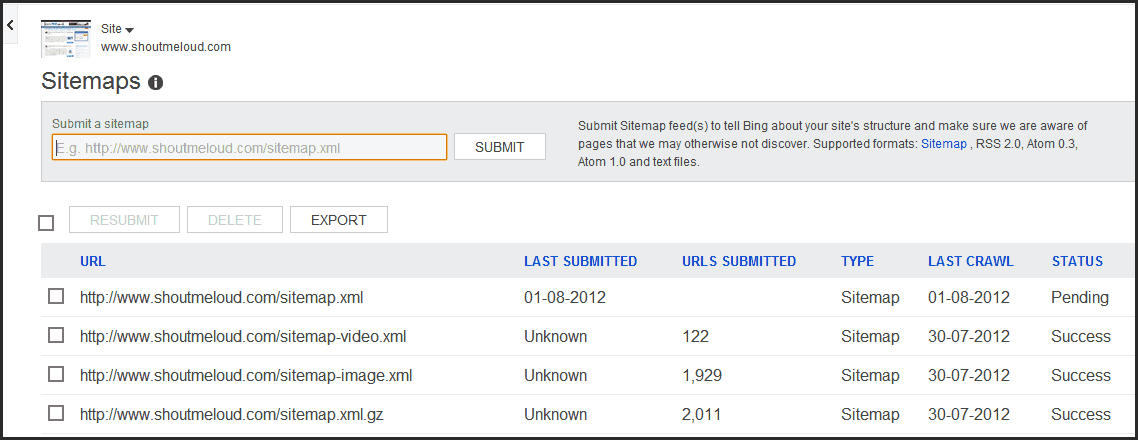
I have created separate sitemap for Images and videos and I must
admit Bing bots are smart enough to pick all sitemaps from an existing
site. You can generate your Image and video sitemap using Image sitemap and video sitemap plugins and under Dashboard > Configure my site> Sitemap you can add new sitemap to Bing.
Submit individual URL:
If you have submitted a complete new site and
it may take time for bing bots to crawl and index your site completely,
you can manually add few links in here. Bing have put a limit of 50
URL’s submission per month and daily cap is 10. You should also check
our earlier guide on how to make bots to crawl your site faster.
Ignore URL parameters:
If your site pages are indexed with URL parameters like replytocom in Bing search, you can simply add this Parameter here and ask bing to ignore all such links. I hope if Bing populates few URL parameter by default like Google Webmaster tools does.
When I checked my indexed pages in Bing search, I realized I have few
pages with attachment_id parameter indexed, now you all know what I did
to get rid of such links from Bing.
Crawl Control:
This is another interesting feature by BWT, as they allow you to control when Bing bots
should crawl your site more. So, you can set the most busy time of your
blog and bing bots will select the time to crawl your site more when
your site is less busy. This is useful for high traffic sites and sites
with limited hosting bandwidth.
Block URL’s and directory in Bing search:
So somehow, bots started indexing your wp-content, tags or categories
folder. Or you decided to remove all tags and categories or any other
directory from Bing search, this section will help you to do the same.
You can stop indexing of any page or directory on your site using Block
URL section. This manual URL removal applies for 90 days and you will
get an Email notification 8 days prior to completion of 90 days, and you
can decide to keep the out of index or let it index in Bing.
Grant Access to your Webmaster tool to other users:
This is useful for many people like me who offers Free WordPress setup,
as I can quickly add my client site using my Bing webmaster tools
account and give him admin access later. Also, if you manage your blog
with a team or
with a partner, you can quickly give access to your site webmaster tool
using users section. There are three roles which you can given:- Read only
- Read and modification
- Administrator access
Copyright of shoutmeloud.com

 Peek at the comments (
0
)
Peek at the comments (
0
)
30 Days to More Productivity and Traffic
-
Unknown
-
No comments
-
Friday, July 27, 2012
-
Free Backlinks
,
SEO
,
Seo Strategy
,
Seo Tips
,
Traffic
,
White Hat Seo
7 Proven Steps To Generate Traffic To Your Website
-
Unknown
-
No comments
-
SEO
,
Seo Strategy
,
Seo Tips
,
White Hat Seo
Generating traffic to your website is imperative if you intend to
make money online. This is usually the main challenge for a new web
business. In this article I will cover 7 simple steps to get started in
generating targeted traffic to your website:
1. Ensure that you have high quality content:
The first thing that you need to do is to have good quality content. In the World Wide Web, content is king!!!
The only way to have a flow of targeted traffic visiting you website daily is by having relevant content. Search engines love good strong content.
Commit the time and effort to create strong engaging content. Make this a high priority; this is important to your successful website.
2. Social Network Marketing:
This is by far the best way in my opinion to generate targeted traffic to your website, if done right of course. Social Networks are growing like wild fire and have a thriving market for every niche. There are many social networks and more still to come, get involved immediately.
3. Go for affiliates:
Affiliate programs mean that you will hire individuals to promote your website or products. In exchange, you will have to pay them a certain percentage of your profits, their commissions. There are many ways to pay your affiliates and you can choose any way that suits you. This is great way to delegate and leverage the marketing of your website.
4. Submitting to directories:
In order to make your website more visible, submit it to popular directories like Open Directory Project, Zeal and others. You can also submit to directories which have themes so that their topics are relevant to your website. You can also go for small directories which can get hold of a lot of in bound links for you.
5. Go for a bit of video marketing:
Make a video promoting your website and then post it on any of the popular video websites. Post it on YouTube, Break.com or even on various social networking sites. Try to make an interesting video which will be appreciated by your target audience. If they like your video, they will circulate it and that would be a great kind of publicity for your website. Make it a point to include the URL of your website in that video.
6. Create free reports, articles and blog post:
Create enticing reports, blog posts and articles with relevant content to your business. A great way to promote your website is to add a link of your website frequently to these. Once you write the report, give it away for free to different website owners, article directories, blog sites, etc. Once these go viral you can ensure that you will get a great deal of traffic.
7. Posting free ads:
Post advertisements in places where you are sure to get traffic. Craigslist is a great place to post a free ad; forums are also great for this. Be creative let your ads stand out, use images, colors, etc.
1. Ensure that you have high quality content:
The first thing that you need to do is to have good quality content. In the World Wide Web, content is king!!!
The only way to have a flow of targeted traffic visiting you website daily is by having relevant content. Search engines love good strong content.
Commit the time and effort to create strong engaging content. Make this a high priority; this is important to your successful website.
2. Social Network Marketing:
This is by far the best way in my opinion to generate targeted traffic to your website, if done right of course. Social Networks are growing like wild fire and have a thriving market for every niche. There are many social networks and more still to come, get involved immediately.
3. Go for affiliates:
Affiliate programs mean that you will hire individuals to promote your website or products. In exchange, you will have to pay them a certain percentage of your profits, their commissions. There are many ways to pay your affiliates and you can choose any way that suits you. This is great way to delegate and leverage the marketing of your website.
4. Submitting to directories:
In order to make your website more visible, submit it to popular directories like Open Directory Project, Zeal and others. You can also submit to directories which have themes so that their topics are relevant to your website. You can also go for small directories which can get hold of a lot of in bound links for you.
5. Go for a bit of video marketing:
Make a video promoting your website and then post it on any of the popular video websites. Post it on YouTube, Break.com or even on various social networking sites. Try to make an interesting video which will be appreciated by your target audience. If they like your video, they will circulate it and that would be a great kind of publicity for your website. Make it a point to include the URL of your website in that video.
6. Create free reports, articles and blog post:
Create enticing reports, blog posts and articles with relevant content to your business. A great way to promote your website is to add a link of your website frequently to these. Once you write the report, give it away for free to different website owners, article directories, blog sites, etc. Once these go viral you can ensure that you will get a great deal of traffic.
7. Posting free ads:
Post advertisements in places where you are sure to get traffic. Craigslist is a great place to post a free ad; forums are also great for this. Be creative let your ads stand out, use images, colors, etc.
Why Add Guest Blogging to Your SEO Campaign?
-
Unknown
-
No comments
-
SEO
,
Seo Strategy
,
Seo Tips
,
White Hat Seo
There are a lot of SEO professionals who are saying that guest
blogging is one of the most effective ways to improve the rankings of
your website. However, there are still a lot of people who are not using
it, thinking that they will only provide another website with a content
that they worked hard for. Guest blogging is a process wherein you will
be submitting a blog post to another blog and have it posted there. The
owner of the blog will then review your post and will have it published
on his website, together with a link pointing to your blog or website.
If you think that SEO now only revolves around the content that you have on your website, then you're optimizing your website the wrong way. You still need to build links around it, but it should have the quality and consistency of a credible informant. Since you will only be submitting your blog post to an authority site, you will be able to enjoy link juice that is coming from a website that has better position than yours. Aside from this, the readers of the blog where you published your post will also find your site, and if you give them all the information that they are looking for, chances are, they will be your subscribers.
The fact that you will be able to enjoy link juice coming from authority sites is already enough for you to start considering guest blogging. Imagine if you can get at least a post with a link every day from different websites. Where do you think your website will be? Below or above the websites of your competitors? This is something that you need to think of, especially now that it is not that hard for one to create a blog post that is referring to a particular topic. Just make sure that you are going to submitting a post that is unique, and will never be submitted to another website; else you will only be wasting your time and will probably ruin your website and your reputation as a blogger at the same.
If you still think that you are not capable of creating blog posts on a regular basis, then it would be better if you are going to look for a company that can provide you with such service. This will be a lot easier because these companies are also optimizing their own websites for it to appear higher in the search results. All you have to do is to compare them with each other and choose the one that has the best services, reputation, and of course, pricing structure. There are a lot of SEO companies that are promising to be the best, but the truth is that they cannot even deliver half of what they are claiming. Be very careful with it, because a wrong company could not only waste your money, but also ruin the rankings of your website, together with the performance of your business.
If you think that SEO now only revolves around the content that you have on your website, then you're optimizing your website the wrong way. You still need to build links around it, but it should have the quality and consistency of a credible informant. Since you will only be submitting your blog post to an authority site, you will be able to enjoy link juice that is coming from a website that has better position than yours. Aside from this, the readers of the blog where you published your post will also find your site, and if you give them all the information that they are looking for, chances are, they will be your subscribers.
The fact that you will be able to enjoy link juice coming from authority sites is already enough for you to start considering guest blogging. Imagine if you can get at least a post with a link every day from different websites. Where do you think your website will be? Below or above the websites of your competitors? This is something that you need to think of, especially now that it is not that hard for one to create a blog post that is referring to a particular topic. Just make sure that you are going to submitting a post that is unique, and will never be submitted to another website; else you will only be wasting your time and will probably ruin your website and your reputation as a blogger at the same.
If you still think that you are not capable of creating blog posts on a regular basis, then it would be better if you are going to look for a company that can provide you with such service. This will be a lot easier because these companies are also optimizing their own websites for it to appear higher in the search results. All you have to do is to compare them with each other and choose the one that has the best services, reputation, and of course, pricing structure. There are a lot of SEO companies that are promising to be the best, but the truth is that they cannot even deliver half of what they are claiming. Be very careful with it, because a wrong company could not only waste your money, but also ruin the rankings of your website, together with the performance of your business.
How to Write a 400 Word Article Quickly
-
Unknown
-
No comments
-
SEO
,
Seo Strategy
,
Seo Tips
,
White Hat Seo
One of the real keys to article marketing is to be able to write articles quickly. This means being able to crank out 400 word articles fast, so fast that in one hour you can write 3-5 articles. This means that in one year, you could write 1000 or more articles, writing just one hour per day. That's right - 3 articles a day = 1000 articles a year, give or take. And 5 per day = about 1500 per year. Imagine if one year ago you had started writing 5 articles per day, and you had 1000 or 1500 articles online right now, what would that really mean for you? What would it mean for you if you had that many articles right now?
How much more traffic would you be getting to your website? Would it be worth it? If you think it would be worth it, then the next step is to ask "what can I do to get to where I can do it"? So if it is important, then you take the next step - just do it. And in this article, I will show you how.
First, you are limited by your typing speed. If you type at 20 words per minute, you can type 400 words in 20 minutes. If you type less than 20 words per minute, it will take you longer. If you type at LESS than 20 words per minute, I suggest finding a way to type faster. That might mean practice. That might mean taking a typing class. Would it be worth taking one month and learning to type faster to be able to type 2 times as fast for the rest of your life? You would double your productivity! Imagine that. One month investment in typing. And a doubling of personal productivity for the rest of your life!
So just do it. Learn to type faster.
Second: Learn to organize your articles faster. The way I do it is think of a topic. Then in the first paragraph I explain why it is important that I share what I am going to write about. Notice how I do this in this article. Go read my last 5 articles as more examples.
3rd: Now just write the article. Don't worry about structure of the article. Just write what you know. It's only 400 words. You can speak 400 words in about 3 minutes. Just write what comes to your mind. Edit later. You might not need to make any edits except for spelling. Just write.
By Sean R Mize
SEO Ranking: Coping With Constant Changes!
-
Unknown
-
No comments
-
Tuesday, March 6, 2012
-
Blogger
,
SEO
,
Seo Strategy
,
White Hat Seo
Any website owner would be distressed to see their ranking on the
search engines drop overnight. A first reaction might be an urgent call
to ask the designer what went wrong. The revolution in business
development, internet marketing strategy, new clients and keeping with
time constraints are some of the challenges that SEO copes with as well
as constant change. So it is indeed important to know about some of the
ongoing activities happening on the internet that directly affects SEO
ranking.
Google Preview
On November 11, 2010 Google launched a new feature in online search, the Google instant preview. This is the ability to have a glimpse of the web page design on the Google SERP's. Located next to the title in any search result is a "magnifying glass" icon that can be clicked on and a preview of the website pops up.
In terms of SEO, Google preview means there is now a visual representation of individual web design that can impress users through any search results preview. A poorly designed index web page perceived by a user will most likely not be clicked on to be viewed. Changes such as this to a leading search engine becomes a continuous challenge to web designers to catch the user's attention with a simple lay-out scheme.
Best Trends
With differing opinions regarding users searching capability and the best web design SEO practices, it still is possible to ensure that a website ranks high on SERP's. Following are the three best trends that can be applied to increase SEO rankings in these changing times.
Google Preview
On November 11, 2010 Google launched a new feature in online search, the Google instant preview. This is the ability to have a glimpse of the web page design on the Google SERP's. Located next to the title in any search result is a "magnifying glass" icon that can be clicked on and a preview of the website pops up.
In terms of SEO, Google preview means there is now a visual representation of individual web design that can impress users through any search results preview. A poorly designed index web page perceived by a user will most likely not be clicked on to be viewed. Changes such as this to a leading search engine becomes a continuous challenge to web designers to catch the user's attention with a simple lay-out scheme.
Best Trends
With differing opinions regarding users searching capability and the best web design SEO practices, it still is possible to ensure that a website ranks high on SERP's. Following are the three best trends that can be applied to increase SEO rankings in these changing times.
- Social Media Optimization (SMO) - SMO is an internet marketing strategy using social media sites such as Facebook, MySpace, Twitter, YouTube and many others. Using various SMO to communicate products to social media users can greatly help achieved goals to optimize a business website. SMO offers added features like: RSS feeds; sharing buttons; polling tools; functionality for incorporating videos, presentations and images; user ratings and other promotional activities like blogging; comments; ability to participate in discussion groups; and posting personal status updates, all of which can be advantageous for any business internet presence.
- Real Time Search - This is one of the innovative features added to Google search that began in December 2009. Through this feature, finding the most relevant result is easier since dynamic results are being delivered from many different sources including real-time information. This changed algorithms and Google's gained power over its competitors to offer SEO benefits by: utilizing the latest topical and breaking news to improve SEO; getting feedback to improve business performance; and scan for great ideas on trending topics to start business marketing campaigns.
- Load Time - As had been predicted, one of the changes that leading search engines implemented and rapidly affected website SEO rankings was the page load time. If any page on a website takes too long to load, a decline in ranking should be expected. Note what Google recommends: that pages should load within 3 seconds or less; it accomplished, high-ranking can be continually enjoyed on this leading search engine.
SEO Tips for Website Images
-
Unknown
-
No comments
-
Blogger
,
SEO
,
Seo Strategy
,
Seo Tips
,
White Hat Seo
Several SEO methods can be used in tandem with your image to attract as many visitors to your site as possible.
The File Name should contain Keywords
The first, and an often overlooked step, is to ensure that you have used the keyword for the image inside what you have named the file. This is similar to having made sure that the keyword is in your URL; as having the keywords in the names of these files assists search engines in determining relevancy to searches. Use this method with all images, especially those that are more than just simple decoration. It will help your image appear more often in the results by content search, and in a higher place on the results list. Google suggests that website hosts gather the images into a single folder on the website as opposed to having them strewn about the pages.
Select Relevant Images
The most important thing about your image is that it be relevant to the content of your page. Whether explaining something specific, or serving as a layout enhancement; relevancy to your content is the most important aspect of an image. When an image has been optimized for a search engine, cohesiveness is the key factor that produces results. Having an image on the page that does not tie in with the site is something to consciously avoid. Presenting attractive and relevant images can critically impact your potential customer base via the content. Images attract, and maintain the attention of your visitors, and should serve as an enhancement to the content provided to keep a person engaged. As tempting as it is to have large flashy images, avoid this pitfall. Avoid having a large quantity of images on the site. This can clog the load time of the site, and some visitors will click out of a web-page that doesn't load quickly.
Use Alt Text or Text Tags
Images on the page need to have a title as well as an alternative text tag, ALT Text, to describe it. While the qualities of the image should be able to be extracted from the content of the page, having these two pieces of information can serve a reverse purpose. Studies show casual surfers are drawn to the images of a page when first reaching it. Having an informative title coupled with quality descriptive text can make those who are just surfing interested enough to read the rest of the page. If the image is a navigational tool that connects to another page, it is important to have the descriptive text reflect the content of the other page ensuring browsers that the link will lead to the content they want to view.
Anchor Text
Having the complete information of an image attached to the image, known as anchor text, helps with the automation aspect of a search engine as it allows for a quicker indexing of the image in their database. Having a SEO image is beneficial as the image will show up in a search engine when only the only search criterion is the keyword.
By Eric T Callahan
The File Name should contain Keywords
The first, and an often overlooked step, is to ensure that you have used the keyword for the image inside what you have named the file. This is similar to having made sure that the keyword is in your URL; as having the keywords in the names of these files assists search engines in determining relevancy to searches. Use this method with all images, especially those that are more than just simple decoration. It will help your image appear more often in the results by content search, and in a higher place on the results list. Google suggests that website hosts gather the images into a single folder on the website as opposed to having them strewn about the pages.
Select Relevant Images
The most important thing about your image is that it be relevant to the content of your page. Whether explaining something specific, or serving as a layout enhancement; relevancy to your content is the most important aspect of an image. When an image has been optimized for a search engine, cohesiveness is the key factor that produces results. Having an image on the page that does not tie in with the site is something to consciously avoid. Presenting attractive and relevant images can critically impact your potential customer base via the content. Images attract, and maintain the attention of your visitors, and should serve as an enhancement to the content provided to keep a person engaged. As tempting as it is to have large flashy images, avoid this pitfall. Avoid having a large quantity of images on the site. This can clog the load time of the site, and some visitors will click out of a web-page that doesn't load quickly.
Use Alt Text or Text Tags
Images on the page need to have a title as well as an alternative text tag, ALT Text, to describe it. While the qualities of the image should be able to be extracted from the content of the page, having these two pieces of information can serve a reverse purpose. Studies show casual surfers are drawn to the images of a page when first reaching it. Having an informative title coupled with quality descriptive text can make those who are just surfing interested enough to read the rest of the page. If the image is a navigational tool that connects to another page, it is important to have the descriptive text reflect the content of the other page ensuring browsers that the link will lead to the content they want to view.
Anchor Text
Having the complete information of an image attached to the image, known as anchor text, helps with the automation aspect of a search engine as it allows for a quicker indexing of the image in their database. Having a SEO image is beneficial as the image will show up in a search engine when only the only search criterion is the keyword.
By Eric T Callahan
The Top 8 SEO Basics You Need to Know
-
Unknown
-
No comments
-
Thursday, January 12, 2012
-
Blogger
,
How To
,
SEO
,
Seo Strategy
,
Seo Tips
,
White Hat Seo
Search engine optimization (SEO) is an important component of any successful website, but do you know your SEO basics as well as you should? Here are top 8 fundamentals that you absolutely need to know about search engine optimization:
Basic #1 - Content is King
Search engine optimization for beginners always begins with good content. This basically boils down to making good on what you promise with your website. Provide the information you claim to provide, supply the goods or services you advertise, and any good relevant information you believe will be useful to your website visitors.
Basic #2 - Selecting Relevant Keywords/Phrases
Keywords are phrases that a target web visitor is most likely to type into a search engine when looking for specific products, services, or information. This means the content provided in your web pages needs to be seeded with the right keywords. The right balance between relevance and words with less competition needs to be achieved. The most relevant keywords may be too competitive with other sites, while less competitive keywords may not get a large enough number of searches.
Basic #3 - URL Links Need to Be Relevant
The Uniform Resource Locator (URL), or website address link of a website and its subsequent web pages must be as relevant to the content as possible. For example, a URL of www.feldonsflashlights.com/types/LEDflashlights will be more effective SEO-wise than www.feldonsflashlights.com/folder3/00034.htm because the former web address spells out what is in the page content, "LED flashlights." Not only will the former URL be more attractive to search engines, but may also be easier for users to read and remember.
Basic #4 - Page <Title> Tag Must Match the Content
One of the most important and yet overlooked SEO basics is selecting a relevant title for the title tag of "each" page. It is imperative that the title be brief enough to fit in a small space but broad enough to effectively communicate the content of the web page. The title tag is very important because it tells the search engines what a page is all about. The title tag information shows up in the most upper-left hand corner of the computer screen for each page in a web browser.
Basic #5 - Use of the Description Meta Tags
Description meta tags go hand-in-hand with effective page titles because the description can be used to catch the attention of a web visitor. A good description meta tag and a call to action can convince a web visitor to actually click the link and enter the site. While some SEO experts have minimized the importance of this tag (because they say it is no longer important to search engines), the fact is that it is the text your web visitors see when they read your listing on the search engine results page and could be the one factor that gets a potential visitor to click or not based on what he reads.
Basic #6 - Use of Heading Tags (<H1><H2><H3>)
Once a web user lands on a page, he should see a relevant headline with keywords included that let him know he's in the right place! This is another one of those SEO basics that many website owners overlook. Heading tags count towards the visibility of a website on search engines because the keywords included in these tags tells the search engines what the page is all about.
Basic #7 - Importance of Image File Names and the Alt Text Value
Using keyword phrases when naming image files to match the content of a web page, as well as, using keyword phrases in the "alt" value of an image tag, adds significant SEO value to a web page when search engines filter through images on a web page. Rather than naming a file something like, "picture2.jpg"-a much better file name for a search engine may be something like, "LED-flashlights-small.jpg" and including the same phrase as the image tag "alt" value.
This would look something like: alt="Small LED Flashlights"
Basic #8 - Keep Learning...SEO is Always Changing!
Just like everything else in technology, the Internet is always changing-so is search engine optimization. This makes it important for anyone with a business web presence to continue to learn about changes in SEO and keep their website updated accordingly.
Keeping all these SEO basics in mind should arm you with the basic foundational knowledge needed to get you started in search engine optimization for your business website.
Basic #1 - Content is King
Search engine optimization for beginners always begins with good content. This basically boils down to making good on what you promise with your website. Provide the information you claim to provide, supply the goods or services you advertise, and any good relevant information you believe will be useful to your website visitors.
Basic #2 - Selecting Relevant Keywords/Phrases
Keywords are phrases that a target web visitor is most likely to type into a search engine when looking for specific products, services, or information. This means the content provided in your web pages needs to be seeded with the right keywords. The right balance between relevance and words with less competition needs to be achieved. The most relevant keywords may be too competitive with other sites, while less competitive keywords may not get a large enough number of searches.
Basic #3 - URL Links Need to Be Relevant
The Uniform Resource Locator (URL), or website address link of a website and its subsequent web pages must be as relevant to the content as possible. For example, a URL of www.feldonsflashlights.com/types/LEDflashlights will be more effective SEO-wise than www.feldonsflashlights.com/folder3/00034.htm because the former web address spells out what is in the page content, "LED flashlights." Not only will the former URL be more attractive to search engines, but may also be easier for users to read and remember.
Basic #4 - Page <Title> Tag Must Match the Content
One of the most important and yet overlooked SEO basics is selecting a relevant title for the title tag of "each" page. It is imperative that the title be brief enough to fit in a small space but broad enough to effectively communicate the content of the web page. The title tag is very important because it tells the search engines what a page is all about. The title tag information shows up in the most upper-left hand corner of the computer screen for each page in a web browser.
Basic #5 - Use of the Description Meta Tags
Description meta tags go hand-in-hand with effective page titles because the description can be used to catch the attention of a web visitor. A good description meta tag and a call to action can convince a web visitor to actually click the link and enter the site. While some SEO experts have minimized the importance of this tag (because they say it is no longer important to search engines), the fact is that it is the text your web visitors see when they read your listing on the search engine results page and could be the one factor that gets a potential visitor to click or not based on what he reads.
Basic #6 - Use of Heading Tags (<H1><H2><H3>)
Once a web user lands on a page, he should see a relevant headline with keywords included that let him know he's in the right place! This is another one of those SEO basics that many website owners overlook. Heading tags count towards the visibility of a website on search engines because the keywords included in these tags tells the search engines what the page is all about.
Basic #7 - Importance of Image File Names and the Alt Text Value
Using keyword phrases when naming image files to match the content of a web page, as well as, using keyword phrases in the "alt" value of an image tag, adds significant SEO value to a web page when search engines filter through images on a web page. Rather than naming a file something like, "picture2.jpg"-a much better file name for a search engine may be something like, "LED-flashlights-small.jpg" and including the same phrase as the image tag "alt" value.
This would look something like: alt="Small LED Flashlights"
Basic #8 - Keep Learning...SEO is Always Changing!
Just like everything else in technology, the Internet is always changing-so is search engine optimization. This makes it important for anyone with a business web presence to continue to learn about changes in SEO and keep their website updated accordingly.
Keeping all these SEO basics in mind should arm you with the basic foundational knowledge needed to get you started in search engine optimization for your business website.
Angeline Plesek is the owner of WebPageMarketingBasics.com...as a
web developer and freelance copywriter, she realizes the importance of
web page optimization and how it relates to the bottom line for all
business owners that have an online presence. It isn't just about how a
website looks--there is more to improving conversion rates online.
By
Angeline Plesek
Optimizing With Google Analytics
-
Unknown
-
No comments
-
Free Backlinks
,
How To
,
Keyword Research
,
SEO
,
Seo Strategy
,
Seo Tips
,
Webmaster Tools
,
White Hat Seo
In your journey to become an internet business master, one of the
most important things to learn is how to use web analytics. Analytics
data is useful for optimizing your content, specifically in keyword
ranking, landing page development, visitor retention, social engagement,
and more. But in order to use analytics data, you must first understand
analytics data. Each week I will add a way to use Analytics to benefit
your websites; this week is keyword ranking. Here is a rundown of what
metrics to use for keyword ranking and search engine optimization using
Google Analytics.
Keyword Ranking Part I
Google Analytics is extremely helpful for this type of work and has not only provided traffic source data but also information specifically tailored to search engine optimization. In the traffic sources menu, you can see the number of visits that came from the organic traffic medium, which means that visitors used a search engine which displayed organic (non-ad impression) search results that included a page on your website. If you have a lot of visits using the organic search medium, it could indicate that your website's pages are ranking for some search query (usually in the top 3 pages). You can view the keywords that were being searched to identify exactly which terms you may be ranked for or should be optimizing to rank for.
Once you are ranking for some keywords, Google Analytics can also display information for the number of impressions that your site has within search results. An impression, in this situation, is simply the presence of your site's url within any search result display. For some keywords your site may be ranking multiple times (but with different pages at each ranking position) and more than one keyword can be ranked to the same page(s). Analytics also shows the number of clicks on those impressions, the average position within search rankings (numeric value), and the click through rate (CTR), which is the percentage of clicks out of all impressions. Low CTR's could indicate that you should improve the quality of the meta description of your site's pages. The meta description is the short trail of information that appears directly below the title of your listing in search results.
To sum up, these are the specific metrics that you should be looking at when performing an analysis for keyword ranking:
Keyword Ranking Part I
Google Analytics is extremely helpful for this type of work and has not only provided traffic source data but also information specifically tailored to search engine optimization. In the traffic sources menu, you can see the number of visits that came from the organic traffic medium, which means that visitors used a search engine which displayed organic (non-ad impression) search results that included a page on your website. If you have a lot of visits using the organic search medium, it could indicate that your website's pages are ranking for some search query (usually in the top 3 pages). You can view the keywords that were being searched to identify exactly which terms you may be ranked for or should be optimizing to rank for.
Once you are ranking for some keywords, Google Analytics can also display information for the number of impressions that your site has within search results. An impression, in this situation, is simply the presence of your site's url within any search result display. For some keywords your site may be ranking multiple times (but with different pages at each ranking position) and more than one keyword can be ranked to the same page(s). Analytics also shows the number of clicks on those impressions, the average position within search rankings (numeric value), and the click through rate (CTR), which is the percentage of clicks out of all impressions. Low CTR's could indicate that you should improve the quality of the meta description of your site's pages. The meta description is the short trail of information that appears directly below the title of your listing in search results.
To sum up, these are the specific metrics that you should be looking at when performing an analysis for keyword ranking:
- Medium - the means through which visitors were sent to your site; this is not the technology used with the internet browser. Examples include organic, referral, and email.
- Keyword - what keyword phrase were searched when traffic was sent organically Queries - what search query was entered when your site appeared in search results
- Impressions - the number of times a page from your site appeared in search results
- Average Position - the average search position that a page from your site is ranking for a given keyword; this is a numeric value which is created by averaging the ranking of your site over the course of the time period you are viewing data for.
- CTR - this is the click-through-rate of your impressions; it is given as a percentage, and is calculated by this equation: (Clicks/Impressions) 100
The Secret Behind SEO Link Building Services
-
Unknown
-
No comments
-
SEO
,
Seo Strategy
,
Seo Tips
,
Webmaster Tools
,
White Hat Seo
When the concept of computers was first introduced to the market,
they were mainly used for office functions. Today, the internet is
widely used to run businesses. For anyone running an online business, it
is essential to make the most of SEO link building services. There are
many companies that offer these services but the question is what is
secret behind these services? There are two major benefits of SEO link
building services and they include:
- They allow for increased web visibility or top ranking in search engine systems.
- They also help to generate quality traffic to a site hence, increased productivity and profitability.
When running a business online exploring these services is one of the best decisions that you can ever make. This is because different search engines identify a site by the type of links it has. As a matter of fact, a site that has quality back links gets top ranking than a site with poor back links. Therefore, getting the services makes your website more visible, for top ranking and a cutting edge against relevant competitors.
Additionally, the services play a crucial role in determining how long you are going to be in business online. A site that has poor back links is at risk of getting loses. In some instances, low ranking can mean permanent expulsion from top engines. Therefore, take time to find the best services and prolong the life of your business online.
What's more, the services help you to trade profitably. SEO campaign is very important in that, it helps a business to get the best traffic. It makes your website highly functional and more appealing to target prospects. For this reason, they will often visit the site to discover the kind of products and services that you provide. In addition, clients always love pages that load faster. Quality back links direct clients instantly to the kind of information or service they are looking for. Therefore, the services help you to make the most of SEO and link building campaign, so as to run a business successfully.
The cost of getting these high quality SEO services can be relatively high depending on the needs of your website. Even so, there are many companies that offer cheap link building services online. Explore them and make your site more visible. Most importantly, settle for quality cheap link building services for effective solutions and better results.
- They allow for increased web visibility or top ranking in search engine systems.
- They also help to generate quality traffic to a site hence, increased productivity and profitability.
When running a business online exploring these services is one of the best decisions that you can ever make. This is because different search engines identify a site by the type of links it has. As a matter of fact, a site that has quality back links gets top ranking than a site with poor back links. Therefore, getting the services makes your website more visible, for top ranking and a cutting edge against relevant competitors.
Additionally, the services play a crucial role in determining how long you are going to be in business online. A site that has poor back links is at risk of getting loses. In some instances, low ranking can mean permanent expulsion from top engines. Therefore, take time to find the best services and prolong the life of your business online.
What's more, the services help you to trade profitably. SEO campaign is very important in that, it helps a business to get the best traffic. It makes your website highly functional and more appealing to target prospects. For this reason, they will often visit the site to discover the kind of products and services that you provide. In addition, clients always love pages that load faster. Quality back links direct clients instantly to the kind of information or service they are looking for. Therefore, the services help you to make the most of SEO and link building campaign, so as to run a business successfully.
The cost of getting these high quality SEO services can be relatively high depending on the needs of your website. Even so, there are many companies that offer cheap link building services online. Explore them and make your site more visible. Most importantly, settle for quality cheap link building services for effective solutions and better results.
Five Great Tips for Small Business SEO
-
Unknown
-
No comments
-
Tuesday, December 6, 2011
-
Blogger
,
SEO
,
Seo Strategy
,
Seo Tips
,
White Hat Seo
Search engine optimization is a huge industry in today's digital
age. Small businesses are a huge percentage of overall businesses in the
world. An SEO might ask oneself...what steps should I take on behalf of
my small business SEO client in order to maximize internet success? For
many, answering this question can be troubling because small businesses
need to maximize user experience and still maintain a competitive edge
in search engines. However, with these five tips, you can make this
project much easier on yourself and more successful for your client.
1.) Content is Still the Reigning King
What does this mean for you? It means as an SEO who is working with small business clients, a lot of your budget must go towards content creation. Every piece of information this company has on hand, and could possibly be valuable to consumers, needs to be out on the web. There is no better way to increase brand awareness, and rankings than writing valuable content. With social media being a huge component of internet marketing, write this content in a concise, and easy to read manner. Keep in the back of your head though, all of the content conventions for search engine optimization; maintain proper keyword density, headings, etc. All of this content should be directed towards user experience, while maximizing its affect on ranking through proper content creation techniques.
2.) Make it Relatable
Consumers love reading content that they can relate to. Whenever someone views a small business website, or searches for that matter, there is always a reason; these reasons should not be difficult to analyze. If your client runs a restaurant, the reason for humans visiting their site is to find information about their food, location, etc. Make the content on the website relatable to these key aspects. Show your visitors your expertise, and give them something meaningful to ponder. Like I previously said, in today's age of social media, it only takes one reader to make your website go viral. Write content in a way that you can convert your website's visitors into your own marketing tools.
3.) Target Local Search
Most queries on search engines include some sort of geographic modifier, as an SEO, you need to make sure that your client's website ranks well for all relevant geographic locations. If your client is located in the heart of Los Angeles, you must obviously target their keywords with a Los Angeles modifier; but don't neglect to target other similar districts as well. Spend some time targeting Santa Monica, Burbank, and other nearby cities. Smaller geographic locations tend to be much less competitive, but can still increase traffic dramatically.
4.) Optimize Internal Link Structure
This is an obvious reason for search engine optimization, but it also goes hand-in-hand with user experience. How many times have you been on a small business website when you simply cannot find what you are looking for? All valuable information should be easy to find, and the navigation should be structured properly. In blogs, reference old posts or relevant pages, this will help users find what they are looking for, and it will also create a web for search engine crawlers to get stuck in. Regardless, refining this link structure will really increase the value of your webpage to both humans, and computers.
5.) Linkbuilding for Small Business Sake
The number of back links a website has, and their respective anchor texts, are a huge proportion in the current ranking algorithms. As an SEO, you need to build links, but they must be built properly for your client to reap the benefits. Look for relevant websites that meet the criteria of having great, relatable content that is linked properly, and targets money keywords. Simply put, target relevant websites that are doing a good job at marketing their website. I cannot stress this enough, quality over quantity. It baffles me as to why some SEOs still automate the link building process. Not only is this dangerous, but it creates an incredibly inefficient link profile that can come back to hurt you. Spend time building these links with care, and do it efficiently.
All in all, SEO for small business revolves around the following: local keywords, user experience, and structure. Through great content you can really traverse up the ranking ladder, and by targeting local keywords and providing a great user experience you can target consumers that are looking for small businesses in your location. Additionally, a great user experience will really help you convert a visitor, into a customer. Small business SEO is a smaller discipline of search engine marketing, but many businesses can really benefit from this process. Proceed with diligence, care, and functionality.
1.) Content is Still the Reigning King
What does this mean for you? It means as an SEO who is working with small business clients, a lot of your budget must go towards content creation. Every piece of information this company has on hand, and could possibly be valuable to consumers, needs to be out on the web. There is no better way to increase brand awareness, and rankings than writing valuable content. With social media being a huge component of internet marketing, write this content in a concise, and easy to read manner. Keep in the back of your head though, all of the content conventions for search engine optimization; maintain proper keyword density, headings, etc. All of this content should be directed towards user experience, while maximizing its affect on ranking through proper content creation techniques.
2.) Make it Relatable
Consumers love reading content that they can relate to. Whenever someone views a small business website, or searches for that matter, there is always a reason; these reasons should not be difficult to analyze. If your client runs a restaurant, the reason for humans visiting their site is to find information about their food, location, etc. Make the content on the website relatable to these key aspects. Show your visitors your expertise, and give them something meaningful to ponder. Like I previously said, in today's age of social media, it only takes one reader to make your website go viral. Write content in a way that you can convert your website's visitors into your own marketing tools.
3.) Target Local Search
Most queries on search engines include some sort of geographic modifier, as an SEO, you need to make sure that your client's website ranks well for all relevant geographic locations. If your client is located in the heart of Los Angeles, you must obviously target their keywords with a Los Angeles modifier; but don't neglect to target other similar districts as well. Spend some time targeting Santa Monica, Burbank, and other nearby cities. Smaller geographic locations tend to be much less competitive, but can still increase traffic dramatically.
4.) Optimize Internal Link Structure
This is an obvious reason for search engine optimization, but it also goes hand-in-hand with user experience. How many times have you been on a small business website when you simply cannot find what you are looking for? All valuable information should be easy to find, and the navigation should be structured properly. In blogs, reference old posts or relevant pages, this will help users find what they are looking for, and it will also create a web for search engine crawlers to get stuck in. Regardless, refining this link structure will really increase the value of your webpage to both humans, and computers.
5.) Linkbuilding for Small Business Sake
The number of back links a website has, and their respective anchor texts, are a huge proportion in the current ranking algorithms. As an SEO, you need to build links, but they must be built properly for your client to reap the benefits. Look for relevant websites that meet the criteria of having great, relatable content that is linked properly, and targets money keywords. Simply put, target relevant websites that are doing a good job at marketing their website. I cannot stress this enough, quality over quantity. It baffles me as to why some SEOs still automate the link building process. Not only is this dangerous, but it creates an incredibly inefficient link profile that can come back to hurt you. Spend time building these links with care, and do it efficiently.
All in all, SEO for small business revolves around the following: local keywords, user experience, and structure. Through great content you can really traverse up the ranking ladder, and by targeting local keywords and providing a great user experience you can target consumers that are looking for small businesses in your location. Additionally, a great user experience will really help you convert a visitor, into a customer. Small business SEO is a smaller discipline of search engine marketing, but many businesses can really benefit from this process. Proceed with diligence, care, and functionality.
Top 10 Things You Need to Know to Be Found on Google
-
Unknown
-
No comments
-
Blogger
,
SEO
,
Seo Strategy
,
Seo Tips
,
White Hat Seo
1. Age. Search engines care how old your site is. The age of the site is an indication of how established your business is. If you have been around awhile, the search engines see you as a more viable business than one that just started up a couple of weeks ago. It's a trust issue. Unfortunately, there's not much you can do about how old your site is. However, if you're thinking of scrapping your old domain and building a new site on a new domain, you might reconsider. There are valid reasons for scrapping an old domain in favor of a new one, but if you have a decent domain name and history, be sure you re-direct the pages of the old site to the new URL to keep some of the age history.
2. URL structure. If your URLs make sense to a person reading them, they'll make sense to a search engine's spider and will help your rankings. Use readable keywords of value in your URL and skip all the random characters that don't make sense to anybody. For example, MyBusiness.com/shoes makes more sense and will help your search rankings more than MyBusiness.com/1047/WTF/1234
3. Content is King. Search engine spiders index web pages for the text that's contained within them. The more relevant content on your site, the more opportunity it has to be indexed.
To be returned as a result to a particular search, the content on your pages must contain the text that was used in the search. DON'T, however write content trying to please the search engines without consideration for the humans that will read it. It would do you no good to have the first position on the Search Engine Results Page if everyone who comes to your site immediately leaves because the content doesn't make sense. And you wouldn't stay #1 long anyway.
Search engine spiders can also tell if you have been "stuffing" your content with your keywords to try to influence them to index you higher. Double-stuffed Oreos might be a nice treat, but not on a web page. You can optimize any given page for one or two keyword phrases. Don't try to get every keyword on every page. It won't make sense to your visitors and it won't help you with the search engines.
Make sure your keyword phrases are included in the most important parts of your site like headings and internal links. Have logical meta data that makes sense to users who will read your titles and descriptions. Also be sure to have Alternate Text with your keywords for your images. Search Engine spiders can't "read" images, but they can read captions and "alt text" and these will add strength to your keywords.
Don't include a lot of content that the search engines can't index. The worst offender of this is Flash. Flash can create beautiful, engaging content that moves and is just, well cool. However, the search engines can't read and index it so it doesn't help you from a search engine optimization standpoint. Use Flash sparingly as long as it's delivering a relevant, engaging experience for your visitors. Entire sites built in Flash may look cool, but they won't be indexed by the search engines so you won't get organic traffic.
4. Content Age. While Google likes to see a site that's been around a while (see #1 above) it doesn't want to see the exact same content on those pages for all that time. From a search engine's perspective, a site that hasn't been updated in a while likely has outdated information or may even be out of business. These are not good things for a search engine to return in a search engine result to visitors. Updating content on a regular basis is critical to keeping your site on the radar with the search engines.
5. Site performance. Google is indexing what people do when they're on your site. If they leave immediately, known as a "Bounce", Google will understand that your site is not relevant for that keyword phrase and will not return the page as a result. Your site performance is telling Google that you're not relevant for those keywords. Remember, Google has to return the most relevant results or they'll become the MySpace of search (no offense MySpace). This is why (#3) above is so important. Your content has to engage your visitor. Write for the visitor and include items that will get, and keep, them engaged with your site. When a visitor finds your site, you need to engage them with your content and move them along a path that answers their questions to get them to the goal of your website, which can be to purchase a product, visit your store or contact you in some way.
6. Internal Links. Pages on your site need to be linked to each other in a relevant way. The goal is to lead your visitors on a journey to a specific goal you have defined. Your link structure should reflect that. Links from your keyword phrases of value to more information on that subject are indications to the search engines that those keywords are important. You don't want a whole lot of "click here" links or you'll be indexed for "click here" instead of "great shoes". Besides, you don't want to compete with Adobe (just for fun, type "click here" in Google and see who's site is optimized for that term).
7. External Links. The search engines see links to your site from other sites as an indication of your popularity or relevance. In general, the more links to your site, the better. But there are a couple of important considerations. The site linking to you should have a reason to link to you. If you sell women's shoes and your brother-in-law is a contractor, there's no real reason for his site to link to yours. More importantly, consider the value that the search engine places on the site that links to you. If Google doesn't think very highly of the site that links to you, it's not going to give you many "points" for that link. Alternatively, if Google ranks the site that links to you very highly, it will pass on some of that authority, or "link juice" to your site. You want to have as many links to your site from sites that the search engines value as you can possibly get. Think of it as a popularity contest. Just like in high school, the more of the popular people that say they like you, the more popular you become.
8. Trust. It all comes down to trust. Do visitors trust you and do the search engines trust you. Unfortunately, over the years there have been many attempts to "game" the search engines. Now they're wary. The search engines are looking for reasons to trust you. And your human visitors are the same way. They've been fooled before and they want to know they can trust you. Anything that you can put on your site to inspire confidence and trust is likely a good thing. Simple things like your address and phone number inspire trust. Testimonials from satisfied clients inspire trust. Third party emblems from trusted brands inspire trust. Consider who your target audience trusts and how you can incorporate that into your site.
9. Speed. Google loves speed. They love it so much that they include the speed with which they return their results to you right at the top of the page next to the number of results they have delivered. If your site loads slowly, not only are you going to disappoint visitors to your site, you're going to rank lower than another site with a faster page load time (all other things being equal of course). Simplify your site and get those speed hogging elements off it or downsized to load faster.
10. Local Search. In the past year, Google has tried to increase the relevancy of its search results by giving the local guy a shot. Of course, big brands with millions of dollars in their marketing war chest have had an advantage in the search game. Think of it like television advertising. The brands with the big bucks can advertise on national network television during the Superbowl while the mom-and-pops have trouble even affording basic cable advertising. In the interest of searchers, Google has tried to level the playing field by placing a much bigger emphasis on local search. This gives the local business a chance to compete with his larger national competitor.
Geo-Targeting. So what does this mean to you? Optimize your site and all your web properties with geo-targeted search terms. If the service area for your business is Long Island and people would search for your business with the term Long Island (for example, "Best Long Island NY Shoe Store") make sure that search term is in the content on your page.
Places and Local. Also, make sure you "claim" all your local pages and directory listings. You've likely seen the first listings on a local search engine results page that that shows the business name, their Google Places page, their website and a map listing. Make sure you "claim" this page and optimize it for your keywords of value. Add photos and videos to it. Google's version is called Google Places, but Bing and Yahoo have their own local pages.
Local Web Properties. And then there are the directories. Search for your business name in any search engine. You'll hopefully find there are a number of results that are not your website. Go to these sites, verify the information is correct and claim these listings. If the information is not correct, correct it.
Accuracy is Critical. Ensure that all of your "web properties" have your name, address and phone number EXACTLY the same, down to the format of your address. "St." in one listing and "Street" in another is going to confuse the search engines and not give you the credibility you deserve.
Well, I promised I was only going to give you 10 so I'll stop here. There are a number of other things you can do to help your search engine rankings, but these are the top 10 most common to all businesses, as I see it. Now you're likely asking so what does that mean to me? What can I do about it?
By James F Ruppel
Top SEO Tips Today
-
Unknown
-
No comments
-
Monday, November 21, 2011
-
Blogging Tips
,
How To
,
SEO
,
Seo Strategy
,
Seo Tips
,
White Hat Seo
Many small business owners struggle with getting their website ranked
- you are not alone. Small business owners needs quality websites, and
often they are not sure what it takes to get it noticed by customers.
The SEO tips below should help you with these problems.
Tip 1:
Never design your website without SEO. Make sure your web designer understands your reasoning for organic SEO. Doing a retrofit on your shiny new Flash website after it is built won't do it. Spiders can crawl text but not Flash or images.
Tip 2:
Got a new website you want spidered? Submitting your website to Google's search engines take weeks. The quickest way to get your website spidered is by getting a link to it through another quality site.
Tip 3:
When defining the keywords for your page, try to only target a maximum of three per page and make sure that the keywords you are using actually exist in your web page at the beginning paragraph, middle of the body and ending paragraph of the page.
Tip 4:
It's very important to get listed in other online business directories? Listings of your business in directories such as Local.com, Yellowpages.com, your local city's chamber of commerce, or directories affiliated with your business can help boost your page's ranking.
Tip 5:
There many of plugins for WordPress, a handful of favorites that can make a huge difference when it comes to optimizing your site. These SEO plugins take the work out of optimization and allow you to focus on other strategies, like content! WordPress's All-in-One SEO Pack or HeadSpace2 SEO.
Tip 6:
Try different strategies: The goals of an SEO campaign is to convert a lead. A successful campaign can be attained when integrated with other campaigns. Think about attracting visitors that are at an early stage of buying. Think about strategies to get them to sign up for your newsletter.
Tip 7:
Optimizing your pages, such as keywords, heading tags, and internal links can help search engines better recognize the content of these pages and how they're structured. Many of these optimizations aid users' navigation and usability of the site. You have total control over page optimization, it greatly depends on you to make it happen
Tip 8:
Use bold text. Use the tags around some of your keywords throughout your page. Don't use them everywhere
Tip 9:
Have several articles related to your website's Keywords. Make sure you use a different keyword search term for them. For instance, one article might use the keywords "Healthy foods for Babies," while another might use the term "Babies Healthy Foods."
By Scott Bueller
Tip 1:
Never design your website without SEO. Make sure your web designer understands your reasoning for organic SEO. Doing a retrofit on your shiny new Flash website after it is built won't do it. Spiders can crawl text but not Flash or images.
Tip 2:
Got a new website you want spidered? Submitting your website to Google's search engines take weeks. The quickest way to get your website spidered is by getting a link to it through another quality site.
Tip 3:
When defining the keywords for your page, try to only target a maximum of three per page and make sure that the keywords you are using actually exist in your web page at the beginning paragraph, middle of the body and ending paragraph of the page.
Tip 4:
It's very important to get listed in other online business directories? Listings of your business in directories such as Local.com, Yellowpages.com, your local city's chamber of commerce, or directories affiliated with your business can help boost your page's ranking.
Tip 5:
There many of plugins for WordPress, a handful of favorites that can make a huge difference when it comes to optimizing your site. These SEO plugins take the work out of optimization and allow you to focus on other strategies, like content! WordPress's All-in-One SEO Pack or HeadSpace2 SEO.
Tip 6:
Try different strategies: The goals of an SEO campaign is to convert a lead. A successful campaign can be attained when integrated with other campaigns. Think about attracting visitors that are at an early stage of buying. Think about strategies to get them to sign up for your newsletter.
Tip 7:
Optimizing your pages, such as keywords, heading tags, and internal links can help search engines better recognize the content of these pages and how they're structured. Many of these optimizations aid users' navigation and usability of the site. You have total control over page optimization, it greatly depends on you to make it happen
Tip 8:
Use bold text. Use the tags around some of your keywords throughout your page. Don't use them everywhere
Tip 9:
Have several articles related to your website's Keywords. Make sure you use a different keyword search term for them. For instance, one article might use the keywords "Healthy foods for Babies," while another might use the term "Babies Healthy Foods."
By Scott Bueller
Link Building For SEO
-
Unknown
-
No comments
-
Blogger
,
How To
,
SEO
,
Seo Strategy
,
White Hat Seo
There are a plethora of articles and advice about link building, but
the ones I have read don't really tell you how to do it. Or rather they
tell you how you need to get backlinks from other sites to your own, and
say that you need to scatter your URL around the Internet on sites that
are relevant to your niche, and so eventually climb the Search Engine
Rankings Pages (SERPS). What these article and advice don't tell you is
how you actually make a link, and neither do they suggest that
cross-referencing (building links to your different articles and posts
all with their individual address) within your site is also good for
your site's Search Engine Optimization (SEO), so that the site climbs
the search engine's (e.g. Google's) index pages.
When you are typing your article in the box provided or have copy-pasted it into your site, you will see two links in a chain. You click on this icon and will be given a box which may have the "http:// " part of the address already given, but may not, in which case you have to type this in along with the "www. and address and identity" of the article you want to link to. This information can be found in the long, elongated box at the top of your screen, but be careful, if you are typing the address manually that you have copied all of it. To ensure that you have done so, click on this box and it will turn blue, then click again and run through the box to the end of the address. Believe it or not, some people only type in the address part that they can see and so do not have a link that works in their post. Always test the link to make sure that it works.
When you cross-reference in this way you are ensuring that traffic stays longer on your site. People will click on the links to find the extra information on stand-alone posts or articles, and in theory at least, the longer someone stays in you site, the more chances there are of your making a sale. The bounce rate (the length of time your visitors spend on your site) will be low as they stay rather than just look at one article or product and exit rapidly.
Of course, to cross-reference and have links to other parts of your site, you need to have plenty of original, engaging content. This means that you have to work at building up your site to take advantages of the opportunities having a domain affords you. This is why you cannot expect a site to climb in the SERPS immediately, it takes time and effort. If you are really new to online marketing some advice from a reputable SEO professional would be of immense value to you and your new site.
Every time you add content to your site, make sure that there are references that can be made into links with other pages in your site and go back to the post you are referring traffic to and add a link to your new post. If you leave this part of the work until later, you may have a huge amount of work to update in three months, and if you leave it longer, you will be faced with a daunting task, so do it when you add new posts with backlinks to others.
When you are typing your article in the box provided or have copy-pasted it into your site, you will see two links in a chain. You click on this icon and will be given a box which may have the "http:// " part of the address already given, but may not, in which case you have to type this in along with the "www. and address and identity" of the article you want to link to. This information can be found in the long, elongated box at the top of your screen, but be careful, if you are typing the address manually that you have copied all of it. To ensure that you have done so, click on this box and it will turn blue, then click again and run through the box to the end of the address. Believe it or not, some people only type in the address part that they can see and so do not have a link that works in their post. Always test the link to make sure that it works.
When you cross-reference in this way you are ensuring that traffic stays longer on your site. People will click on the links to find the extra information on stand-alone posts or articles, and in theory at least, the longer someone stays in you site, the more chances there are of your making a sale. The bounce rate (the length of time your visitors spend on your site) will be low as they stay rather than just look at one article or product and exit rapidly.
Of course, to cross-reference and have links to other parts of your site, you need to have plenty of original, engaging content. This means that you have to work at building up your site to take advantages of the opportunities having a domain affords you. This is why you cannot expect a site to climb in the SERPS immediately, it takes time and effort. If you are really new to online marketing some advice from a reputable SEO professional would be of immense value to you and your new site.
Every time you add content to your site, make sure that there are references that can be made into links with other pages in your site and go back to the post you are referring traffic to and add a link to your new post. If you leave this part of the work until later, you may have a huge amount of work to update in three months, and if you leave it longer, you will be faced with a daunting task, so do it when you add new posts with backlinks to others.
Getting Started The Right Way With Search Engine Optimization
-
Unknown
-
No comments
-
How To
,
SEO
,
Seo Strategy
,
White Hat Seo
It's Still About Text
With sites like Flickr, Facebook and YouTube it's easy to assume that video and images are overtaking the humble written word. It's important to realize that the Internet is still very much driven by text. Video, photos and social media are important yes, however text is the backbone, it's how the Internet works. Therefore it makes sense when getting started with search engine optimization to focus on text, which.
Starting With Research
A "Keyword" is the name given to the words and phrases that people type into search engines. The first thing new SEO practitioners need to think about is what keywords would people use to find your products and services?
Let's assume you sell widgets. What keywords would you like your site to appear for? Would you like your site to appear in the search results for "Blue widgets", "Widgets in Australia" or what about "How to use widgets".
It's one thing to understand the keywords, it's another to understand the traffic volumes for those keywords. If no one is search for "Blue widgets" there is little point in optimising your site for that keyword. So how do you know the traffic for any given keywords? Lucky, Google have the solution. Do a search for "Google keyword tool" and spend some time getting familiar with this tool.
Here's a pro tip: See what results you get when you use the "Exact Match" setting.
Are You Competitive?
How powerful is your site based on the competition? How would you know?
When you search for the keywords look at the first 5 spots? Are they big sites, with lots of content? Do they have hundreds or thousands of pages of content?
An indicator of a strong or important site is the number links that point to the site from other sites on the Internet. How can you tell? This is where you need to look at using some more tools. Do a search for "backlink analysis" and you see a number of free and paid tools that will help you understand the competition.
Choose a tool and find out how many links your competitors have. Next, break use a spreadsheet to track your site's authority, linking root domains, and pages indexed and see how your website stacks up against your competition.
Start With On-Page SEO
While links are important getting your website sorted out and optimised is the most critical thing you can do to boost your rank in search engines. Every page of your website is unique. This means the title tag (title of you page) should be written specifically for every page of your website. Here's an example title tag: Widgets | How To Use Blue Widgets. Make sure your page is relevant for the "How to use blue widgets". Make sure all your images are tagged and that your page contains links to sources relevant for the content.
With sites like Flickr, Facebook and YouTube it's easy to assume that video and images are overtaking the humble written word. It's important to realize that the Internet is still very much driven by text. Video, photos and social media are important yes, however text is the backbone, it's how the Internet works. Therefore it makes sense when getting started with search engine optimization to focus on text, which.
Starting With Research
A "Keyword" is the name given to the words and phrases that people type into search engines. The first thing new SEO practitioners need to think about is what keywords would people use to find your products and services?
Let's assume you sell widgets. What keywords would you like your site to appear for? Would you like your site to appear in the search results for "Blue widgets", "Widgets in Australia" or what about "How to use widgets".
It's one thing to understand the keywords, it's another to understand the traffic volumes for those keywords. If no one is search for "Blue widgets" there is little point in optimising your site for that keyword. So how do you know the traffic for any given keywords? Lucky, Google have the solution. Do a search for "Google keyword tool" and spend some time getting familiar with this tool.
Here's a pro tip: See what results you get when you use the "Exact Match" setting.
Are You Competitive?
How powerful is your site based on the competition? How would you know?
When you search for the keywords look at the first 5 spots? Are they big sites, with lots of content? Do they have hundreds or thousands of pages of content?
An indicator of a strong or important site is the number links that point to the site from other sites on the Internet. How can you tell? This is where you need to look at using some more tools. Do a search for "backlink analysis" and you see a number of free and paid tools that will help you understand the competition.
Choose a tool and find out how many links your competitors have. Next, break use a spreadsheet to track your site's authority, linking root domains, and pages indexed and see how your website stacks up against your competition.
Start With On-Page SEO
While links are important getting your website sorted out and optimised is the most critical thing you can do to boost your rank in search engines. Every page of your website is unique. This means the title tag (title of you page) should be written specifically for every page of your website. Here's an example title tag: Widgets | How To Use Blue Widgets. Make sure your page is relevant for the "How to use blue widgets". Make sure all your images are tagged and that your page contains links to sources relevant for the content.
Google Places Cannot Be Neglected Anymore In SEO
-
Unknown
-
No comments
-
SEO
,
Seo Strategy
,
White Hat Seo
Google Places is a great listing for local businesses and getting to the first indexed page is of huge benefit to any business as it will bring in more customers and clients. When you apply for a page in these Google Places, you should make sure that you provide as much information as possible about your business, which means filling in all the optional text fields. You should also upload pictures and videos of your business as the more information you have on your pages, it would appear that the higher you will be ranked in the Place index.
Google Places is rather like a Yellow Pages directory where people look to find products and services that they need and which are specific to a local area. Because of the growth of mobile marketing, the number of mobile devices and an ever-increasing desire on the part of the consumer for a more personalized customer interaction with a business and advertiser, the more important Google Places becomes for a local business owner.
A growing number of searches now concentrate on finding local businesses and services, so your business needs to be in those Google Places so that you have as much Internet exposure to your potential client or customer-base as possible. Because Places listings are increasingly finding their way onto the first pages of a Google search, your business needs to be prominent in order for it to beat the competition.
Looking at businesses that have been highly ranked on Places pages, you can't help but notice that they have been reviewed by customers. The more and better the reviews, it appears that the higher the business is ranked. This has not been stated by Google, but is simply the information for which there is clear evidence in the Places rankings.
As a local business owner you have a client/customer base and you need to ask these people to review your products, business or services. You could have flyers made and give these out at the cash register, requesting satisfied customers to write a review for you.
However the business of getting a review can be problematic, as by their very nature, not all reviews are positive. This then brings online reputation management into play and gives small businesses a need to hire a good SEO company to see that the business has a good online reputation. Any unfounded negative reviews can be negated, refuted or removed from the Net eventually by a professional SEO person who knows how to do these things.
In 2010 local businesses could choose to ignore Google places, but it would be folly to neglect to use them now. As more searches online are to find local providers of whatever the customer/client wants, it is important for local businesses to have a profile on the Places pages so that prospective customers know where to find what they are looking for. A profile which includes visual images be they photos or videos, will have a higher place on the index pages for that category of service or sales. More than ever before a small local business needs help and advice on how to rise in the index rankings and so achieve a high visibility in the Places pages and by extension in Google's Search Engine Rankings Pages (SERPS). God SEO companies are also waking up to this new business opportunity for them and now have a good idea of what is required to get highly places on the Places index. However because Google does not say explicitly what makes for a top position on these index pages, SEO companies can only make recommendations based on their own research and that of others. No company can promise you a first page position. Bear this in mind when you see ads for Places SEO. You don't want to be a victim of a fly-by-night SEO company.
By Lynne Evans
Google Places is rather like a Yellow Pages directory where people look to find products and services that they need and which are specific to a local area. Because of the growth of mobile marketing, the number of mobile devices and an ever-increasing desire on the part of the consumer for a more personalized customer interaction with a business and advertiser, the more important Google Places becomes for a local business owner.
A growing number of searches now concentrate on finding local businesses and services, so your business needs to be in those Google Places so that you have as much Internet exposure to your potential client or customer-base as possible. Because Places listings are increasingly finding their way onto the first pages of a Google search, your business needs to be prominent in order for it to beat the competition.
Looking at businesses that have been highly ranked on Places pages, you can't help but notice that they have been reviewed by customers. The more and better the reviews, it appears that the higher the business is ranked. This has not been stated by Google, but is simply the information for which there is clear evidence in the Places rankings.
As a local business owner you have a client/customer base and you need to ask these people to review your products, business or services. You could have flyers made and give these out at the cash register, requesting satisfied customers to write a review for you.
However the business of getting a review can be problematic, as by their very nature, not all reviews are positive. This then brings online reputation management into play and gives small businesses a need to hire a good SEO company to see that the business has a good online reputation. Any unfounded negative reviews can be negated, refuted or removed from the Net eventually by a professional SEO person who knows how to do these things.
In 2010 local businesses could choose to ignore Google places, but it would be folly to neglect to use them now. As more searches online are to find local providers of whatever the customer/client wants, it is important for local businesses to have a profile on the Places pages so that prospective customers know where to find what they are looking for. A profile which includes visual images be they photos or videos, will have a higher place on the index pages for that category of service or sales. More than ever before a small local business needs help and advice on how to rise in the index rankings and so achieve a high visibility in the Places pages and by extension in Google's Search Engine Rankings Pages (SERPS). God SEO companies are also waking up to this new business opportunity for them and now have a good idea of what is required to get highly places on the Places index. However because Google does not say explicitly what makes for a top position on these index pages, SEO companies can only make recommendations based on their own research and that of others. No company can promise you a first page position. Bear this in mind when you see ads for Places SEO. You don't want to be a victim of a fly-by-night SEO company.
By Lynne Evans
What You Should Know About Social Media - SEO
-
Unknown
-
No comments
-
Sunday, November 13, 2011
-
Blogging Tips
,
SEO
,
Seo Strategy
,
Seo Tips
,
Social Media
The first thing you should know is that finally Google has opened its
social network site Google+ to businesses. It currently has around 40
million users, and while this is no threat in the short term to Facebook
which has around 800 million active users, it's a social media platform
that cannot be ignored.
Clearly the two big players in the social network world are Google+ and Facebook; not to have a presence on both is simply not good SEO sense. If you want your brand or site or company to have maximum publicity online, then you should be a part of these online social networks.
Facebook has its Like button which allows people or fans to express their opinion about certain products or sites and when they press the button, all their friends are informed that they have given something the thumbs up. This may not result in sales, but if only one sale comes from sixty-six Likes, that's better than no sale at all. Incidentally I didn't just pull that figure out of a hat; it was taken from a recent MerchantCircle survey published in August 2011 which surveyed small local businesses.
You should by now have embedded a Facebook Like button along with a Google+1 button onto the pages of your website, as the Google+1 button will, one presumes in the future be an indication to the search engine of your page's popularity and so will affect your position in the Search Engine Rankings Pages (SERPS).
Having a Twitter account which you Tweet to regularly cannot harm your position in SERPS either, in fact the more social media sites you have a presence on, the better for your business and ultimately for your rankings in the SERPS.
Some people in online marketing forget the value of Wikipedia as a social media. It ranks highly in Google's SERPS, even though it might not be the most authoritative site on any one particular topic. If you can contribute to it and get your site linked to pages within it you have got yourself a highly rated backlink.
However there is no getting away from the fact that Facebook and Google are the major league players in social networking and so in online marketing; ignore them at your peril. Google+ Circles allows businesses to categorize their fans into clusters according to age groups and gender etc., so that allows businesses to target specific groups with advertisements. There is no denying that the trend in marketing is for businesses to communicate with consumers and both Facebook and Google+ allow for this to some extent. Both sites are in the business of providing their users with so much information that they will have no need to leave the sites. This means that if your business does not have a presence in these social network sites, it will be losing out to competitors who do have a visible presence in their pages.
Clearly the two big players in the social network world are Google+ and Facebook; not to have a presence on both is simply not good SEO sense. If you want your brand or site or company to have maximum publicity online, then you should be a part of these online social networks.
Facebook has its Like button which allows people or fans to express their opinion about certain products or sites and when they press the button, all their friends are informed that they have given something the thumbs up. This may not result in sales, but if only one sale comes from sixty-six Likes, that's better than no sale at all. Incidentally I didn't just pull that figure out of a hat; it was taken from a recent MerchantCircle survey published in August 2011 which surveyed small local businesses.
You should by now have embedded a Facebook Like button along with a Google+1 button onto the pages of your website, as the Google+1 button will, one presumes in the future be an indication to the search engine of your page's popularity and so will affect your position in the Search Engine Rankings Pages (SERPS).
Having a Twitter account which you Tweet to regularly cannot harm your position in SERPS either, in fact the more social media sites you have a presence on, the better for your business and ultimately for your rankings in the SERPS.
Some people in online marketing forget the value of Wikipedia as a social media. It ranks highly in Google's SERPS, even though it might not be the most authoritative site on any one particular topic. If you can contribute to it and get your site linked to pages within it you have got yourself a highly rated backlink.
However there is no getting away from the fact that Facebook and Google are the major league players in social networking and so in online marketing; ignore them at your peril. Google+ Circles allows businesses to categorize their fans into clusters according to age groups and gender etc., so that allows businesses to target specific groups with advertisements. There is no denying that the trend in marketing is for businesses to communicate with consumers and both Facebook and Google+ allow for this to some extent. Both sites are in the business of providing their users with so much information that they will have no need to leave the sites. This means that if your business does not have a presence in these social network sites, it will be losing out to competitors who do have a visible presence in their pages.
Why Meta Tags Are Important in SEO ?
-
Pham The Quyet
-
No comments
-
Wednesday, November 2, 2011
-
SEO
,
Seo Strategy
,
Webmaster Tools
A good number of people who are new to search engine optimization are often lost when they hear the term Meta tag used regularly in search engine optimization. While Meta tag is a common phrase that is used in search engine optimization it is not too technical to understand the meaning of this term and the role that they play in the process of optimization.
What is a Meta Tag?
This is a term used to refer to a header tag that provides supporting information about a webpage and also interacts with the web server. Basically the tags provide information to search engines on the content of the pages. Meta tags are alternatively uses the http-equiv attributes. The http-equiv tag contains names or value pairs. These are passed to the browser before the document is read by the browser. They are very important in the process of search engine optimization and they should always be check to see that they satisfy the required standards.
Parts of a Meta Tag
Http-equiv Attribute
The definition of this attribute can be said to be a name or value pair that is in found in the MIME document and is always passed to the browser before your page is sent.
Examples of the Meta tag include Charset which identifies the character set in a page, expires that defines when the document will be outdated, refresh that determines the number of seconds that will elapse when you reload a page or open the page to a new page.
Content
This is not found in all Meta tags but those that are well written. Basically it provides the information of the name or value pair.
Name
This is where the name applies and you may use any relevant name to the website. It is therefore the most important part of SEO since you should incorporate the Keywords that are related to the website in this portion of the Meta tag. It also contains a short description, robots, author and copyright. The robots either give permission for indexing by robots or deny. The term "noindex" is used in the case where the robots are not allowed to index a certain web page.
Making Use of Meta Tags in Search Engine Optimization
In getting the best out of these tags as far as optimization is concern is by making use of the tag description by placing the necessary keywords in the description. By putting the keywords in this title description you allow the search engines to categorize your website and therefore improve your ranking. The keywords should be used in a way that they are clear and specific to the theme of the website.
In the past the these tags have been very instrumental in SEO and ranking of the websites since search engines were solely reliant on the them to provide them with the information of a given web page. In today's world they are less significant as the technology of search engine has been development further, however this does not mean that you should not put the SEO relevant descriptions in the these tags. You should always strive to be fully SEO compliant in the structure of the site, design and content.
By Dominic Payne
What is a Meta Tag?
This is a term used to refer to a header tag that provides supporting information about a webpage and also interacts with the web server. Basically the tags provide information to search engines on the content of the pages. Meta tags are alternatively uses the http-equiv attributes. The http-equiv tag contains names or value pairs. These are passed to the browser before the document is read by the browser. They are very important in the process of search engine optimization and they should always be check to see that they satisfy the required standards.
Parts of a Meta Tag
Http-equiv Attribute
The definition of this attribute can be said to be a name or value pair that is in found in the MIME document and is always passed to the browser before your page is sent.
Examples of the Meta tag include Charset which identifies the character set in a page, expires that defines when the document will be outdated, refresh that determines the number of seconds that will elapse when you reload a page or open the page to a new page.
Content
This is not found in all Meta tags but those that are well written. Basically it provides the information of the name or value pair.
Name
This is where the name applies and you may use any relevant name to the website. It is therefore the most important part of SEO since you should incorporate the Keywords that are related to the website in this portion of the Meta tag. It also contains a short description, robots, author and copyright. The robots either give permission for indexing by robots or deny. The term "noindex" is used in the case where the robots are not allowed to index a certain web page.
Making Use of Meta Tags in Search Engine Optimization
In getting the best out of these tags as far as optimization is concern is by making use of the tag description by placing the necessary keywords in the description. By putting the keywords in this title description you allow the search engines to categorize your website and therefore improve your ranking. The keywords should be used in a way that they are clear and specific to the theme of the website.
In the past the these tags have been very instrumental in SEO and ranking of the websites since search engines were solely reliant on the them to provide them with the information of a given web page. In today's world they are less significant as the technology of search engine has been development further, however this does not mean that you should not put the SEO relevant descriptions in the these tags. You should always strive to be fully SEO compliant in the structure of the site, design and content.
By Dominic Payne
Copywriting 101 - How to Strategically Use Keywords to Your Benefit
-
Pham The Quyet
-
No comments
-
How To
,
SEO
,
Seo Strategy
,
Seo Tips
For the longest time, keywords have ruled the SEO game. They aren't the only means to success in the Internet marketing business, but they are still the cornerstone of success. Learning to take advantage of keywords like a pro greatly improves your chances of your website ranking high and getting that much-coveted traffic.
SEO techniques abound, but the most important is what you do with your text content. Where and how you use keywords on your site's content can make or break the game for you.
SEO techniques abound, but the most important is what you do with your text content. Where and how you use keywords on your site's content can make or break the game for you.
- Work for keywords that have potential. By potential, I mean either earning or traffic potential, or both, whichever you want. Some niches and consequently, their niches, get a lot of traffic, but don't make much money. Other keywords get less traffic, but have better prices (that is, advertisers pay more for them). Beware of keywords that get little traffic AND have a low price set on them. You should avoid those. If you target keywords for money, look for words that have high advertiser competition. Use Google's AdWords Keyword Tool to research your niche.
- Use keyword families that are related to one another. Targeting an isolated keyword is impractical. People don't always use the same exact keyword to look up the same topic. A phrase such as "SEO keywords" may be searched as "keywords and SEO" or "keyword optimization" and countless other variations. Incorporate various renditions your keywords for better coverage.
- Write keywords in a natural style. When you use keywords excessively, you are making spam. Search engines hate spam, and so do readers. Do not overuse keywords. This doesn't mean you need to make an exact count of each word as it occurs. Just write content the way you talk about the topic-- naturally.
- Place keywords where they count. That is, in your titles, meta tags, headings, each paragraph of an article (the higher up, the better), and links to your other articles. Without proper labeling of your content, a search engine would have no way of knowing what it is about. So practice good keyword placement.
- Link to your keyword-targeted articles. You can link to your articles from within the same website. That is called internal linking. Many Internet marketers also engage in active link-building campaigns. You can write guest articles for other websites or blogs, and link back to your website. You can also link to your site in your profiles in forums, email signatures, social profiles and more.
SEO Strategies: Search Intelligence
-
Pham The Quyet
-
No comments
-
Friday, October 21, 2011
-
SEO
,
Seo Strategy
Search engine optimization strategie are a shovel, but what is rare is a radically different approach to the classification as well. The other, by their very nature (eg, Google) is looking for fresh content and high quality. I see tons of marketing and a chat days scraping and automotive and blogs for the use of tactics to optimize these "fake site" may hit a place in the ranks temporarily, it will inevitably be short-lived. Real intelligence search engine comes to questions like:
How do I create content that people benefit from link?
What is a radically different approach that leads to a topic that buzz around the net for people interested? Outlook has the power.
What can I publish my blog for most of the free people who would put a $ 10 e-book?
What are people searching for my niche or a main subject and how do I implement the response and the rank for the keywords?
While good SEO is to make the basics a bit and link building technique, it is also the intelligence, imagination and pure creativity. I ranked better in search engines by contacting SEO from a perspective radically different in many cases. Ask yourself these 4 key questions is a surefire way to generate massive quality to rank well in search engines.
How do I create content that people benefit from link?
What is a radically different approach that leads to a topic that buzz around the net for people interested? Outlook has the power.
What can I publish my blog for most of the free people who would put a $ 10 e-book?
What are people searching for my niche or a main subject and how do I implement the response and the rank for the keywords?
While good SEO is to make the basics a bit and link building technique, it is also the intelligence, imagination and pure creativity. I ranked better in search engines by contacting SEO from a perspective radically different in many cases. Ask yourself these 4 key questions is a surefire way to generate massive quality to rank well in search engines.


 Blog Feed
 Follow Me on Twitter
 My Facebook
 TOP
TOP